
How to mock API calls in React: fetch, Axios, MSW or a mock server
The backend is not ready, the real API is flaky, or you need a 500 on demand. Here are the four ways React developers mock API calls, when each one fits, and working code for fetch and Axios against a hosted mock server. Updated September 2026.
The four options in one table
| Option | Where it runs | Best for | Weak spot |
|---|---|---|---|
| Hardcoded fixtures | Inside the component | A five-minute spike | Rots, hides bugs, has to be removed |
| MSW (Mock Service Worker) | Service Worker or Node, in your repo | Unit and component tests | Only your JavaScript, unless you host the handlers yourself |
| json-server | Local Node process | A quick fake CRUD backend on your laptop | Not shared, no error scenarios without code |
| Hosted mock server (Mockfly) | A URL on the internet | Development, demos, QA, mobile, CI | Not for in-process unit tests |
Option 1: hardcoded fixtures
The fastest thing that works, and the first thing that breaks.
const FAKE_TASKS = [{ id: 1, title: 'Buy groceries', completed: false }]

const Tasks = () => {
  const [tasks] = useState(FAKE_TASKS)

  return <ul>{tasks.map(task => <li key={task.id}>{task.title}</li>)}</ul>
}
There is no request, so there is no loading state, no error state and no network latency. When the real API arrives you rewrite the component, and the fixture usually stays behind in a test somewhere, drifting from the contract. Fine for a spike; do not ship a feature on it.
Option 2: MSW for tests
Mock Service Worker intercepts requests inside the browser or Node process and answers from handlers you write next to your tests. The component code is the real code, including fetch, loading and errors.
import { http, HttpResponse } from 'msw'
import { setupServer } from 'msw/node'

const server = setupServer(
  http.get('https://api.example.com/tasks', () => {
    return HttpResponse.json({ tasks: [{ id: 1, title: 'Buy groceries', completed: false }] })
  })
)

beforeAll(() => server.listen())
afterEach(() => server.resetHandlers())
afterAll(() => server.close())
This is the right tool for Jest, Vitest, Playwright and Storybook. Its limit is its strength: the mock lives where that JavaScript runs. A designer cannot click through it, and changing a response usually means changing code or configuration and redeploying. The iOS team can call it, but only if you deploy the handlers as a server with MSW's own @mswjs/http-middleware and then keep that server running. See Mockfly vs MSW for the full comparison.
Option 3: json-server on your laptop
echo '{ "tasks": [{ "id": 1, "title": "Buy groceries", "completed": false }] }' > db.json
npx json-server db.json --port 4000
You get a real HTTP server with CRUD routes over the JSON file. Good for a personal prototype; not shared, every teammate runs their own copy, and returning a 500 or a slow response means writing middleware.
Option 4: a hosted mock server
A hosted mock server gives you a URL that behaves like the backend will: real HTTP, latency, status codes, different responses for different requests, and one place the whole team edits. Here is the full flow with Mockfly, which has a free plan.
1. Create the endpoint
In a Mockfly project, create a GET /tasks endpoint. For the body, either paste JSON, write a Faker.js template so the list changes on every request, or type // a list of 5 tasks and let the AI generate it:
{
  "tasks": [
    { "id": 1, "title": "Buy groceries", "completed": false },
    { "id": 2, "title": "Finish report", "completed": true },
    { "id": 3, "title": "Go to the gym", "completed": false }
  ]
}
Copy the endpoint URL from the project. Every endpoint shares the project base URL:
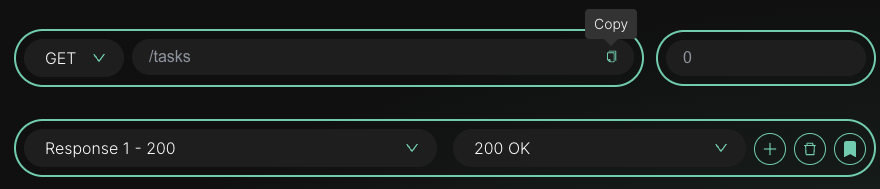
2. Put the base URL in an environment variable
# .env.development (Vite)
VITE_API_URL=https://api.mockfly.dev/mocks/your-project-slug

# .env.production
VITE_API_URL=https://api.example.com
With Create React App the variable is REACT_APP_API_URL and you read it from process.env. Either way, switching to the real API later is a one-line change and the component never knows.
3. Call it with fetch
import { useEffect, useState } from 'react'

const API_URL = import.meta.env.VITE_API_URL

const Tasks = () => {
  const [tasks, setTasks] = useState([])
  const [status, setStatus] = useState('loading')

  useEffect(() => {
    const load = async () => {
      try {
        const response = await fetch(`${API_URL}/tasks`)
        if (!response.ok) throw new Error(`HTTP ${response.status}`)
        const data = await response.json()
        setTasks(data.tasks)
        setStatus('ready')
      } catch {
        setStatus('error')
      }
    }
    load()
  }, [])

  if (status === 'loading') return <p>Loading tasks…</p>
  if (status === 'error') return <p>Could not load tasks.</p>

  return (
    <ul>
      {tasks.map(task => (
        <li key={task.id}>{task.title}</li>
      ))}
    </ul>
  )
}
4. Or with an Axios instance
import axios from 'axios'

export const api = axios.create({ baseURL: import.meta.env.VITE_API_URL })

// In the component
const { data } = await api.get('/tasks')
setTasks(data.tasks)
5. Reproduce the loading and error states
Give the endpoint a delay of 2000 ms in Mockfly and the loading state appears for two seconds. To test the error branch, add a second response to the endpoint with status 500 and a rule: header x-scenario equals error. Then send that header from a debug toggle in your app:
const headers = window.localStorage.getItem('scenario') === 'error' ? { 'x-scenario': 'error' } : {}

const response = await fetch(`${API_URL}/tasks`, { headers })
The same trick covers empty lists, a 401 that should redirect to login, or a 429 that should show a retry message. Nothing in the component changes; the mock decides.
6. Move to the real API, endpoint by endpoint
When the backend ships GET /tasks for real, switch that endpoint to proxy mode in Mockfly and it forwards to the real server while the rest of the project stays mocked. When everything is live, change VITE_API_URL and the mock is out of the picture.
Putting it together
MSW in the test runner, a hosted mock server for everything else, both fed by the same OpenAPI spec if you have one (Mockfly imports it). That gives you fast tests, a URL your whole team and your mobile apps can call, and a clean switch to production.
Create your free mock APIFrequently asked questions
Which option should I use to mock API calls in React?
Use MSW for unit and component tests, where the mock must live in the repo and run without network. Use a hosted mock server such as Mockfly for development, demos, QA and anything a mobile app or another service also needs to call. Many teams use both, generated from the same OpenAPI spec.
Do I need to configure CORS to call a mock server from React?
Not with Mockfly: mock endpoints answer browser requests from any origin, so fetch and Axios work from localhost without a proxy. If you run your own mock server, make sure it sends Access-Control-Allow-Origin.
How do I test loading and error states?
Give the endpoint a delay to see the loading state, and add a second response (for example 500 or 404) selected by a rule, such as a header your app sends only in a "test error" mode. You never touch the component code to reproduce the failure.
How do I switch from the mock to the real API?
Keep the base URL in an environment variable (VITE_API_URL or REACT_APP_API_URL) and change it per environment. To migrate endpoint by endpoint, switch each one to proxy mode in Mockfly so it forwards to the real backend while the rest stay mocked.