
How to mock APIs in Playwright and Cypress E2E tests
End-to-end tests fall apart when they hit a real backend: shared sandboxes drift, rate limits kick in, and a flaky 500 in staging becomes a red CI build. Intercepting every call with page.route or cy.intercept works for a while, then the suite owns a second copy of your API. Here is a cleaner split: keep the browser automation in Playwright or Cypress, and put the API behind a mock you can share, version and run offline.
Why E2E mocks are different from unit mocks
A unit test can stub fetch in the same process. An E2E test drives a real browser against a real UI. The network is part of the product under test: loading spinners, empty states, auth redirects and toast messages only appear when the HTTP response looks a certain way. That means the mock has to behave like an API, not like a function return value.
Three approaches show up in most codebases:
- Hit a shared staging API. Realistic, but slow, contended and hard to push into error cases on demand.
- Intercept in the browser (
page.route,cy.intercept, MSW). Fast and local, but every scenario lives in test code, and Service Worker or multi-tab setups can surprise you. - Point the app at a mock server. The UI makes real HTTP calls. Scenarios live next to the API contract, and the same mock serves local dev, Storybook and CI.
The rest of this article uses the third option with Mockfly, and shows where page.route / cy.intercept still earn their keep.
Step 1: build the mock the suite will call
Create a Mockfly project and add the endpoints your E2E flows touch. A checkout smoke test might need GET /products, POST /cart and POST /checkout. Give each a default happy-path response, then add the unhappy ones as extra responses with custom rules.
A practical pattern is a header such as x-scenario. The default response is the success case; a second response with status 401 fires when the header equals unauthorized; a third with an empty array fires when it equals empty:
// Default GET /products body
[
  { "id": "p_1", "name": "Pro plan", "price": 29 },
  { "id": "p_2", "name": "Team plan", "price": 99 }
]
// Empty-list response body (rule: header x-scenario equals empty)
[]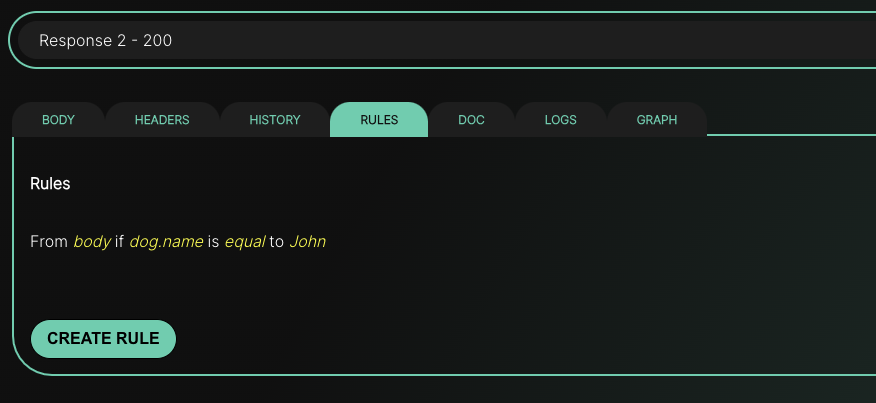
Rules can match body fields, query strings, URL params, headers, JSONPath or XPath. For E2E, a single header is enough: the test sets it, the mock picks the response, and the UI has no special "test mode" beyond what you already use for feature flags. Details and comparators are in the dynamic responses guide.
Add a delay on the endpoint when you care about loading UI. A few seconds is enough to assert a spinner; a delay longer than your client timeout exercises the timeout branch. The delay belongs to the endpoint in Mockfly, so it applies to every response that endpoint returns — see simulating errors and edge cases for the full checklist.
Step 2: point the app at the mock base URL
Copy the project base URL from the Mockfly dashboard (the link icon next to the project) and feed it to the app through an environment variable the E2E runner controls:
# .env.e2e
NEXT_PUBLIC_API_URL=https://api.mockfly.dev/mocks/<your-project-slug>
// lib/api.js — the app always talks to one base URL
const API_URL = process.env.NEXT_PUBLIC_API_URL
export const listProducts = () =>
fetch(`${API_URL}/products`, {
headers: {
'Content-Type': 'application/json',
...(process.env.NEXT_PUBLIC_SCENARIO
? { 'x-scenario': process.env.NEXT_PUBLIC_SCENARIO }
: {}),
},
}).then(r => {
if (!r.ok) throw new Error(`HTTP ${r.status}`)
return r.json()
})Keeping the base URL in env means the same build works against Mockfly, the offline CLI and the real API. When some routes already exist on the backend, turn on proxy mode on the project and mark only the unfinished endpoints as mock — the app still has a single origin.
Step 3: Playwright — config, scenarios and assertions
Start the app with the E2E env, and optionally inject the scenario header for every request from the browser context:
// playwright.config.js
import { defineConfig } from '@playwright/test'

export default defineConfig({
  use: {
    baseURL: 'http://localhost:3000',
    extraHTTPHeaders: process.env.E2E_SCENARIO
      ? { 'x-scenario': process.env.E2E_SCENARIO }
      : {},
  },
  webServer: {
    command: 'yarn build && yarn start',
    url: 'http://localhost:3000',
    reuseExistingServer: !process.env.CI,
    env: {
      NEXT_PUBLIC_API_URL: process.env.MOCK_API_URL,
    },
  },
})
extraHTTPHeaders is applied to document navigations and to requests Playwright itself makes. Forfetch calls from your app, prefer setting the header in the API client (as above) or with page.setExtraHTTPHeaders plus a small request interceptor that forwards it — or drive the scenario from the app with page.addInitScript writing to localStorage, the same pattern used in the edge-cases article.
import { test, expect } from '@playwright/test'

const withScenario = async (page, scenario) => {
  await page.addInitScript(value => {
    window.localStorage.setItem('scenario', value)
  }, scenario)
}

test('catalog shows products from the mock', async ({ page }) => {
  await page.goto('/products')
  await expect(page.getByText('Pro plan')).toBeVisible()
  await expect(page.getByText('Team plan')).toBeVisible()
})

test('catalog empty state when the mock returns []', async ({ page }) => {
  await withScenario(page, 'empty')
  await page.goto('/products')
  await expect(page.getByText('No products yet')).toBeVisible()
})

test('login wall when the mock returns 401', async ({ page }) => {
  await withScenario(page, 'unauthorized')
  await page.goto('/products')
  await expect(page).toHaveURL(/\/login/)
})
The app reads localStorage.scenario (only when NODE_ENV !== 'production') and sends it as x-scenario. The mock rule does the rest. No page.route handlers to keep in sync with the real contract.
Step 4: Cypress — the same mock, different runner
Cypress gets the same base URL and the same header convention:
// cypress.config.js
const { defineConfig } = require('cypress')

module.exports = defineConfig({
  e2e: {
    baseUrl: 'http://localhost:3000',
    setupNodeEvents(on, config) {
      config.env.API_URL = process.env.MOCK_API_URL
      return config
    },
  },
})
// cypress/e2e/products.cy.js
const withScenario = scenario => {
cy.window().then(win => win.localStorage.setItem('scenario', scenario))
}
describe('products', () => {
it('renders the mock catalog', () => {
cy.visit('/products')
cy.contains('Pro plan').should('be.visible')
})
it('shows the empty state', () => {
withScenario('empty')
cy.visit('/products')
cy.contains('No products yet').should('be.visible')
})
it('redirects to login on 401', () => {
withScenario('unauthorized')
cy.visit('/products')
cy.url().should('include', '/login')
})
})You can still use cy.intercept to assert that a checkout POST body looks right, without stubbing the response — let Mockfly answer, and only spy:
cy.intercept('POST', '**/checkout').as('checkout')
cy.get('[data-testid=pay]').click()
cy.wait('@checkout').its('request.body.planId').should('eq', 'p_1')
cy.contains('Payment received').should('be.visible')
When page.route (and Service Workers) still make sense
Browser-level intercepts are the right tool for a few jobs a hosted mock should not own:
- Asserting on the request. Spy with
page.route/cy.intercept, let the mock respond, and check headers or body. - One-off overrides. A single test needs a 503 that is not worth a permanent Mockfly response — stub it for that test only, then fall through to the mock for everything else.
- Offline unit-style browser tests. Component or Storybook tests that must never leave the machine.
The reliability footgun is well known: Playwright's page.route and Cypress's cy.intercept both sit in front of the page's network stack, and an active Service Worker (PWA cache, MSW in the app, a push SDK) can answer before the intercept sees the request. Symptoms look like "my stub never fired" or "the test saw a cached 200". Mitigations that actually help:
- Unregister Service Workers in test setup (
navigator.serviceWorker.getRegistrations()). - Prefer a real HTTP mock for flows that exercise caching, background sync or multi-tab behaviour — the browser talks to a URL, so SW logic runs for real.
- Keep intercepts narrow (method + path) and always call
route.continue()/req.continue()for traffic you do not stub.
// Playwright: spy only, do not stub — Mockfly still answers
await page.route('**/checkout', async route => {
  const request = route.request()
  expect(request.postDataJSON().planId).toBe('p_1')
  await route.continue()
})
Step 5: run the same mocks in CI (online or offline)
Hosted Mockfly is fine for CI if the job can reach the network. Set MOCK_API_URL to the project URL and you are done. When CI should stay offline, or you want zero dependency on an external host, pull the project with the offline CLI:
# once per job, with an account API key from app.mockfly.dev/api-keys
npx mockfly-cli login --key "$MOCKFLY_API_KEY"
npx mockfly-cli pull
npx mockfly-cli serve --port 4000 &

export MOCK_API_URL=http://localhost:4000/<project-alias>
yarn playwright test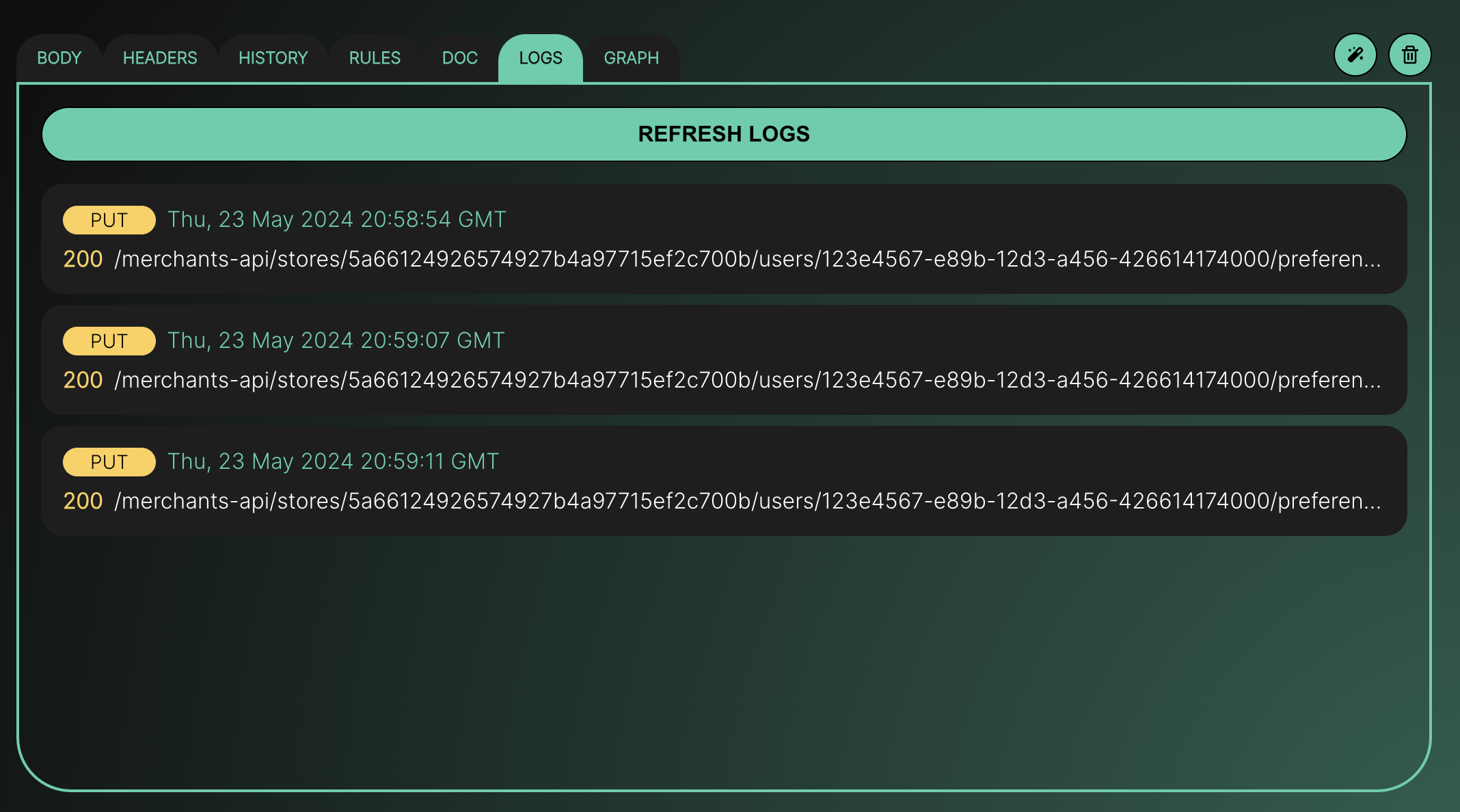
The CLI serves the same response engine as production — conditional rules, Faker placeholders, delays and XML included — from a snapshot under ~/.mockfly/projects. Edit mocks in the web app, pull again, and CI picks up the change. While a run is failing, open the endpoint Logs tab on the hosted project (or watch the CLI stdout) to see which status each request actually got.
A practical checklist
- Every E2E flow has a default happy-path response on the mock.
- Error and empty states are extra responses selected by a rule (header, query or body), not by editing the default.
- The app base URL comes from env, so local, CI and production do not hardcode hosts.
- Playwright / Cypress set the scenario before navigation; production builds cannot enable those switches.
- Intercepts are used to spy or for one-off stubs, not as the second source of truth for the API.
- CI either points at the hosted mock or serves the offline CLI snapshot.
- Service Workers are unregistered in test setup when you do rely on intercepts.
Once the real backend is ready, flip endpoints to it with proxy mode and keep the mock scenarios for the cases staging will never let you trigger on demand. For React-specific client mocking (MSW, fixtures, Axios), see how to mock API calls in React.
Create a free mock API for your E2E suiteFrequently asked questions
Should I use page.route / cy.intercept or a hosted mock API?
Use page.route or cy.intercept for one-off stubs inside a single test, when you need to assert on the exact request payload, or when you want zero network. Use a hosted mock (or the offline CLI) when several tests and environments share the same scenarios, when non-engineers need to edit responses, or when you want delays, multiple status codes and conditional rules without rewriting intercepts.
How do I trigger a 401 or empty list from a Playwright test?
Add a second response on the Mockfly endpoint with that status or body, give it a rule such as header x-scenario equals unauthorized, then send that header from the test with page.setExtraHTTPHeaders or from the app when a test-only scenario flag is set.
Can CI run without calling the hosted mock?
Yes. Pull the project with npx mockfly-cli login && npx mockfly-cli pull, start npx mockfly-cli serve in the job, and point NEXT_PUBLIC_API_URL (or your equivalent) at http://localhost:4000/<project-alias>. The CLI uses the same response engine, including rules and delays.
Does page.route still see requests when the app talks to Mockfly?
Yes. Playwright and Cypress intercept at the browser. If you keep baseURL pointed at Mockfly, page.route and cy.intercept can still spy on or override individual calls. The mock remains the default; the intercept is an escape hatch for one test.
Is this available on the free plan?
Yes within Starter limits: 4 endpoints and 2 responses per endpoint, which is enough for a happy path plus one error scenario per route. Pro and Team remove those limits so one endpoint can hold every scenario your suite needs.