
How to simulate API errors, slow responses and edge cases with a mock API
Your UI works when the API answers 200 in 80 ms. Production will also send it a 401, a 429, a 503 and a response that takes eight seconds. Here is how to reproduce every one of those on demand with a mock API, and the client code that handles them.
Why the happy path is not enough
Most frontends are built against a backend that behaves: a local server with seed data, or a staging environment that rarely fails. The error branches get written, but nobody sees them run until a user does. The usual symptoms are familiar: a spinner that never ends, a blank page instead of an empty state, a form that swallows a validation error, a retry loop that hammers an API that already said "slow down".
Forcing those failures on a real backend is awkward. You cannot ask the payments provider for a 503, and throttling your own API to trigger a 429 means changing server config. A mock API turns each failure into a response you can pick, so the error states become something you develop and test like any other screen.
The scenarios worth reproducing
| Scenario | Status | What the UI should do |
|---|---|---|
| Validation error | 400 / 422 | Show the message next to the field that failed, keep what the user typed |
| Session expired | 401 | Clear the session and send the user to log in, then back to where they were |
| Not allowed | 403 | Explain the missing permission instead of a generic error |
| Not found | 404 | A real "not found" view with a way back |
| Conflict | 409 | Tell the user the data changed and offer to reload |
| Rate limited | 429 | Wait before retrying, and say so |
| Server error / unavailable | 500 / 503 | Retry safe requests a few times, then show a recoverable error |
| Slow response | 200, late | Loading state, no double submits, no layout jump when data arrives |
| Timeout | none | Abort, show a retry option, do not leave the spinner running |
| Empty data | 200 | An empty state, not a broken list |
The building blocks in Mockfly
Everything below uses features documented in the Mockfly docs:
- Multiple responses per endpoint. Each response has its own status code and body, and one of them is the default, the one served when no rule matches. See Editing an endpoint.
- Rules. A response can be served only when the request matches a condition on the body, query string, URL parameters or headers, with comparators such as
equal,notExists,includesorregex. See Conditional responses. - Delay. A delay in milliseconds on the endpoint holds the response back by that long.
- Random response. One button makes the endpoint return one of its responses at random.
- Headers and placeholders. Endpoint headers are set in the Headers tab, and bodies can echo the request with placeholders like
{{body.email}}.
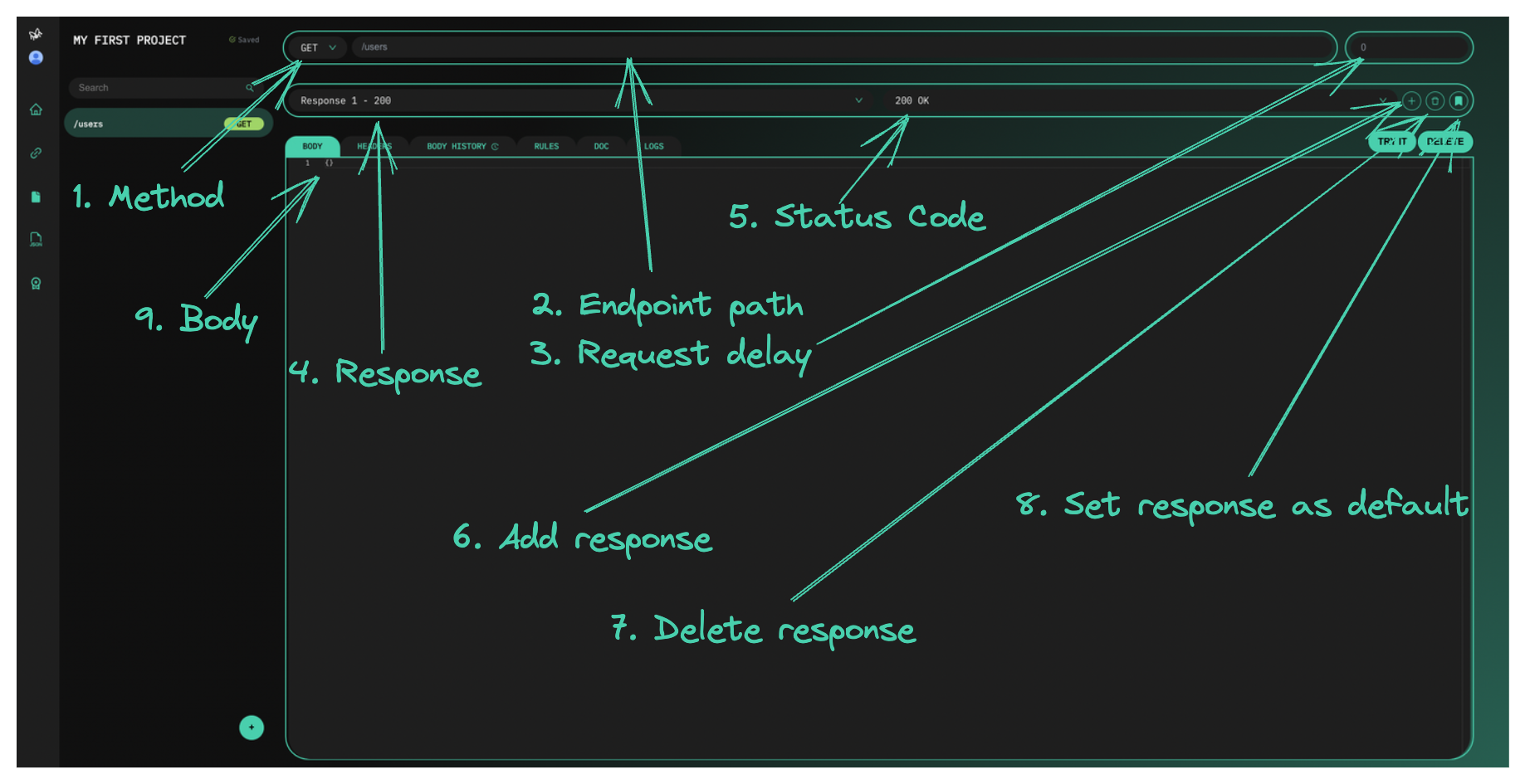
In the endpoint editor, the field next to the path is the delay in milliseconds, the selector next to the response name is its status code, and the "+" button adds another response. One limit to plan around: on the free Starter plan an endpoint holds 2 responses, so you get the happy path plus one error per endpoint. Pro and Team allow unlimited responses per endpoint (see pricing).
The pattern: a scenario header
The cleanest way to pick a failure is to let the client ask for it. Every error response gets a rule on a header that your app only sends in development, say x-scenario:
| Response | Status | Rule |
|---|---|---|
| Orders (default) | 200 | none, served when nothing else matches |
| Rate limited | 429 | Header, x-scenario, equal, rate-limited |
| Server error | 500 | Header, x-scenario, equal, server-error |
| Empty | 200 | Header, x-scenario, equal, empty |
Requests without the header always get the default response, so the rest of the team, the designers and the demo environment never notice the scenarios exist. If you would rather not send a custom header, the same rule works on the query string: Query String, scenario, equal, server-error, and you request /orders?scenario=server-error.
On the client, read the scenario from somewhere you can flip without a rebuild, like localStorage:
// api.js
const API_URL = import.meta.env.VITE_API_URL // https://api.mockfly.dev/mocks/your-namespace

export const request = async (path, options = {}) => {
  const scenario = import.meta.env.DEV ? window.localStorage.getItem('scenario') : null
  const headers = { 'Content-Type': 'application/json', ...options.headers }
  if (scenario) headers['x-scenario'] = scenario

  return fetch(`${API_URL}${path}`, { ...options, headers })
}

// In the browser console:
// localStorage.setItem('scenario', 'rate-limited')
// localStorage.removeItem('scenario')
Recipe 1: 401 when the token is missing
Some failures do not need a scenario header because the request itself triggers them. Add a 401 response to a protected endpoint with the rule Header, Authorization, notExists (presence comparators take no value):
{
  "type": "https://example.com/problems/unauthenticated",
  "title": "Authentication required",
  "status": 401,
  "detail": "Your session has expired. Log in again to continue."
}
The body uses the Problem Details shape from RFC 9457, a good default if your backend has no error format yet. Now log out in your app and the next request comes back 401. The handler worth testing is the one that cleans up and remembers where the user was:
export class ApiError extends Error {
  constructor(status, problem) {
    super(problem?.title ?? `HTTP ${status}`)
    this.status = status
    this.problem = problem
  }
}

export const requestJson = async (path, options) => {
  const response = await request(path, options)
  const body = await response.json().catch(() => null)

  if (response.status === 401) {
    sessionStorage.setItem('returnTo', window.location.pathname)
    window.location.assign('/login')
  }
  if (!response.ok) throw new ApiError(response.status, body)

  return body
}
Recipe 2: 422 with field errors
Rules can read the request body, so the mock can fail the way a real validator would. On POST /signup, add a 422 response with the rule Body, email, notContains, @. The body can echo what was sent:
{
  "title": "Validation failed",
  "status": 422,
  "errors": [
    { "field": "email", "message": "{{body.email}} is not a valid email address" }
  ]
}
Then map the errors back onto the form instead of showing a toast:
try {
  await requestJson('/signup', { method: 'POST', body: JSON.stringify(values) })
} catch (error) {
  if (error.status === 422) {
    const fieldErrors = Object.fromEntries(error.problem.errors.map(e => [e.field, e.message]))
    setErrors(fieldErrors) // keep the values, highlight the fields
    return
  }
  throw error
}
Recipe 3: 404 for one specific id
With a dynamic route like /orders/:id, add a 404 response with the rule URL parameter, id, equal, 999. /orders/1 returns the order, /orders/999 returns your "not found" body. It is the easiest way to give QA a stable link to the not-found view.
Recipe 4: 429 and backing off
The rate-limited response from the table above can tell the client how long to wait:
{
  "title": "Too many requests",
  "status": 429,
  "retryAfter": 3
}
Real APIs usually send that hint as a Retry-After header. In Mockfly, headers are set on the endpoint rather than on each response, so a Retry-After header there would ride along on the 200 too. Read the header when it is present and fall back to the body, which covers both the mock and most real APIs:
const sleep = ms => new Promise(resolve => setTimeout(resolve, ms))

export const withRetry = async (fn, { retries = 3 } = {}) => {
  for (let attempt = 0; ; attempt++) {
    const response = await fn()
    const retryable = response.status === 429 || response.status === 503
    if (!retryable || attempt >= retries) return response

    const body = await response.clone().json().catch(() => ({}))
    const seconds = Number(response.headers.get('Retry-After') ?? body.retryAfter ?? 2 ** attempt)
    await sleep(seconds * 1000)
  }
}

const response = await withRetry(() => request('/orders'))
Reading Retry-After from a cross-origin browser request also requires the server to expose it through Access-Control-Expose-Headers, which is one more reason to keep the body fallback.
Recipe 5: a flaky 500
A server error that always happens is easy to handle. The hard one is the error that happens one request in a few. Define a 200 and a 500 on the endpoint and click the Random response button: Mockfly returns one of the defined responses at random on every call. Reload the page a few times and watch whether your retry logic, your cache and your error boundary behave. Only retry idempotent requests such as GET; a retried POST can create the same order twice.
Recipe 6: slow responses and timeouts
Set the endpoint delay to 3000 and every response is held back three seconds. That is enough to see whether the loading state exists, whether the submit button can be clicked twice, and whether the layout jumps when the data lands.
For timeouts, the client decides what "too slow" means. Give the request a deadline and set the mock delay above it:
const loadOrders = async () => {
  try {
    const response = await request('/orders', { signal: AbortSignal.timeout(5000) })
    return await response.json()
  } catch (error) {
    if (error.name === 'TimeoutError') {
      // show "This is taking longer than usual" with a retry button
      return { timedOut: true }
    }
    throw error
  }
}
With a delay of 8000 on the endpoint, the request is aborted at five seconds and the timeout branch runs every time. With Axios, the equivalent is the timeout option on the instance and an error whose code is ECONNABORTED.
The delay belongs to the endpoint, so it applies to all of its responses. When you need a slow and a fast version side by side, duplicate the endpoint and give the copy its own path and delay, or change the delay while you work on the loading state and set it back to 0 afterwards.
Recipe 7: empty and edge-case data
Not every edge case is an error. An empty list, a name with 200 characters, a price of 0 or a missing optional field breaks more layouts than any 500. Add them as responses behind the same scenario header (x-scenario: empty returning { "orders": [] }), and use Faker placeholders in the default response so the happy path does not always return the same perfectly sized data.
Check what the mock actually returned
When a scenario does not trigger, open the endpoint's Logs tab: it lists each request with its timestamp, route and the status code Mockfly answered with. If you see 200 where you expected 429, the header did not reach the mock or the rule value does not match. The rule modal shows a live sentence, "This response is returned when…", which makes typos in the rule easy to spot.
Run the same scenarios in automated tests
Because the scenario lives in localStorage, an end-to-end test can set it before the app loads and assert on the UI. A Playwright example:
import { test, expect } from '@playwright/test'

const withScenario = async (page, scenario) => {
  await page.addInitScript(value => window.localStorage.setItem('scenario', value), scenario)
}

test('shows a retry message when the API is rate limited', async ({ page }) => {
  await withScenario(page, 'rate-limited')
  await page.goto('/orders')
  await expect(page.getByText('Too many requests')).toBeVisible()
})

test('shows the empty state when there are no orders', async ({ page }) => {
  await withScenario(page, 'empty')
  await page.goto('/orders')
  await expect(page.getByText('No orders yet')).toBeVisible()
})
If your CI should not depend on the network, pull the project with the offline CLI and serve it locally. It answers with the same response engine, conditional rules and delays included:
npx mockfly-cli login   # paste an account API key
npx mockfly-cli pull
npx mockfly-cli serve   # http://localhost:4000/<project-alias>
A checklist before you ship
- Every request has a loading state, and it was seen with a real delay.
- Every request has a timeout, and the timeout path was triggered at least once.
- 401 clears the session and returns the user to where they were after logging in.
- 422 errors land on the fields that caused them.
- 429 and 503 are retried with a wait, a limited number of times, and only for safe requests.
- Lists have an empty state that was rendered against an empty response.
- None of the scenario switches can be turned on in a production build.
Once the real backend exists, switch endpoints to it one by one with proxy mode and keep the error scenarios in the mock for as long as they are useful.
Create your free mock APIFrequently asked questions
How do I make a mock API return a 500 or a 429 on demand?
Add a second response to the endpoint with that status code and a body, then give it a rule, for example header x-scenario equals server-error. Requests that carry the header get the error; every other request keeps getting the default response.
How do I simulate a slow API or a timeout?
Set a delay in milliseconds on the endpoint. A few seconds is enough to see loading states; a delay longer than your client timeout exercises the timeout branch. In Mockfly the delay belongs to the endpoint, so it applies to every response that endpoint returns.
Can I simulate a flaky API that sometimes fails?
Yes. Define a success response and an error response on the endpoint and click the Random response button: Mockfly then returns one of the defined responses at random on each request, which is a quick way to check retries and error recovery.
Does this work on the free plan?
Yes, within the Starter limits: 4 endpoints and 2 responses per endpoint, so each endpoint can hold the happy path plus one error. Pro and Team remove those limits, so a single endpoint can carry every scenario.
Can I use the same error scenarios in CI?
Point your tests at the hosted mock, or pull the project with the offline CLI (npx mockfly-cli) and serve it locally. The CLI runs the same response engine, including conditional rules and delays.