
From an OpenAPI spec to a mock API in 5 minutes
The backend team has agreed the contract, the OpenAPI file is in the repo, and the implementation is two sprints away. You do not need to wait, and you do not need to type the endpoints in by hand: the spec already describes everything a mock needs. Here is how to turn it into a working mock API and what to check before you build on it.
Why mock from the spec
In contract-first development the OpenAPI document is the agreement between frontend and backend. A mock generated from it gives the frontend something real to call on day one, with the same paths, methods, status codes and payload shapes the backend has promised. When the two sides disagree later, the argument is about the spec, not about whose hand-written fixture was wrong.
Writing those mocks by hand is where the drift starts. A typo in a field name, a 404 nobody added, an array that should have been an object: each one is a bug the frontend will carry until the real API shows up. Importing the spec removes that step.
Step 1: get the spec ready
Mockfly reads OpenAPI 3.x and Swagger 2.0, in JSON or YAML. Before importing, two minutes on the spec pay off:
- Add examples where they matter. An
exampleon a response is used verbatim, so the screens you demo show believable data instead of generated placeholders. - Use real status codes. A
defaultresponse or a wildcard like2XXcannot become a Mockfly response, because every response needs a concrete status code. - Tag your operations. The first tag of each operation becomes its folder, so tags give you an organised project for free.
- Check the server URL.
servers[0].url(orbasePathin Swagger 2) is prefixed to every path, so/api/v3in the server URL means your mock routes start with/api/v3too.
Step 2: import it
On your projects page, click Import project, choose OpenAPI in the Format row and hand the document over in one of three ways:
- Paste the spec into the editor; it detects JSON or YAML on its own.
- File: pick a
.json,.yamlor.ymlfile from disk. - URL: Mockfly downloads the spec from its own servers. It must be public, under 10 MB, answer within 10 seconds and not redirect. For a spec behind auth or on an intranet, use File or Paste.
Click Import. If it succeeds, the new project is created and an import summary opens; if it fails, nothing is created and a toast explains why.
Step 3: understand what you got
The importer follows a fixed set of rules, and knowing them saves a lot of guessing:
| In the spec | In Mockfly |
|---|---|
info.title | The project name |
| Each path and method | One endpoint (GET, POST, PUT, PATCH, DELETE, OPTIONS and HEAD) |
/pet/{petId} | The dynamic route /pet/:petId |
tags | Folders, using the first non-empty tag |
responses | One response per status code; the first 2xx is the default |
requestBody | The endpoint's body example, so the request editor is prefilled |
Response bodies come from the media type's example, then the first entry of examples, and only then from the schema. Generated bodies are not frozen text: fields without an example become Faker placeholders, chosen by format. Given this schema:
"Order": {
  "type": "object",
  "properties": {
    "id": { "type": "string", "format": "uuid" },
    "customerEmail": { "type": "string", "format": "email" },
    "status": { "type": "string", "enum": ["pending", "paid", "shipped"] },
    "total": { "type": "number", "example": 49.9 },
    "createdAt": { "type": "string", "format": "date-time" }
  }
}
the imported response looks like this:
{
  "id": "{{string.uuid}}",
  "customerEmail": "{{internet.email}}",
  "status": "pending",
  "total": 49.9,
  "createdAt": "{{faker.date.recent().toISOString()}}"
}
The example is kept, the enum collapses to its first value, and the uuid, email and date-time fields return a fresh value on each call. Any other plain string becomes {{lorem.word}}. Schemas are walked up to 8 levels deep; anything below that comes back as null, which keeps recursive specs from breaking the import.
Step 4: read the import summary
The summary shows how many endpoints, responses and folders were created. If anything was left out, a "N requests were not imported" section groups the skipped items by reason, with the method, path and status code of each. Nothing is dropped silently. The usual suspects:
| Skip reason | Typical fix |
|---|---|
| Only JSON responses can be imported | Expected for downloads and XML. Add those responses by hand; Mockfly can serve files and XML. |
| The "default" response has no status code | Replace default with the codes you actually return, such as 400 and 500, or add them after the import. |
| The status code is not valid | Swap wildcards like 4XX for concrete codes. |
| The example is not a JSON object | The body is a scalar, for example a schema of type string. Wrap it in an object or add it by hand. |
| Another operation is mapped to the same path and method | Two templated paths collapsed onto one route. Rename one of the path parameters or paths in the spec. |
On the free Starter plan, plan limits are checked before anything is written: a spec with more than 4 endpoints, or an operation with more than 2 importable responses, is rejected and nothing is created. Trim the spec to the endpoints you are working on, or upgrade (see pricing) to import it whole.
Step 5: call it from your app
Every project answers at https://api.mockfly.dev/mocks/<namespace>, followed by the paths from your spec, server prefix included. Keep the base URL in an environment variable so switching to the real API later is a config change:
# .env.development
VITE_API_URL=https://api.mockfly.dev/mocks/your-namespace/api/v1
const API_URL = import.meta.env.VITE_API_URL
export const getOrder = async id => {
const response = await fetch(`${API_URL}/orders/${id}`)
if (!response.ok) throw new Error(`Order request failed with ${response.status}`)
return response.json()
}If you generate a typed client from the same spec, point it at the same base URL: the mock and the client agree on every path because they come from one document.
Step 6: make the mock smarter than the spec
The import gives you one response per documented status code, with the first 2xx as the default. The other responses, like a 404, are there but never served until you tell Mockfly when to use them. That is the job of rules. For the imported /orders/:id, give the 404 response the rule URL parameter, id, equal, missing, and /orders/missing returns the not-found body while every other id gets the order.
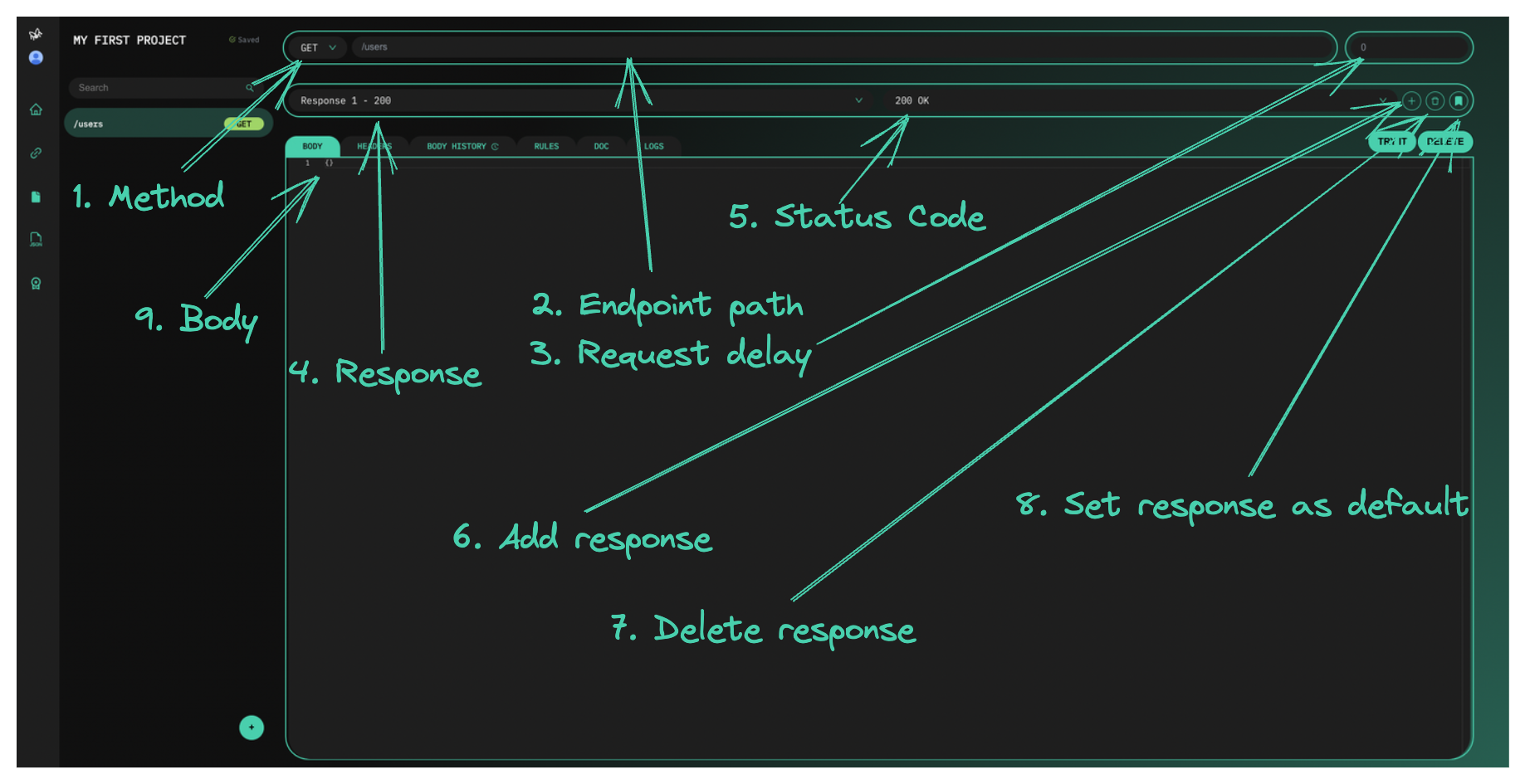
A few more upgrades that the spec cannot express:
- Echo the path parameter with placeholders:
"id": "{{:id}}"makes/orders/42return order 42. - Add a delay in milliseconds on the endpoint to see your loading states. Our guide on simulating API errors and slow responses covers the rest of the failure modes.
- As endpoints go live in the real API, send them through proxy mode one by one while the rest stay mocked.
Keeping the mock in sync when the spec changes
An import is a one-time snapshot: the result is a normal Mockfly project, and later edits to the spec do not flow into it on their own. When the contract changes, either edit the affected endpoints in the project, or import the new version as a fresh project and move your rules and tweaks across if the changes are large. The project can also be exported as Mockfly's own JSON format, so you can keep a copy next to the spec in your repository.
For CI or offline work, the offline CLI pulls your projects and serves them locally with the same response engine, rules and Faker templating included:
npx mockfly-cli login   # paste an account API key
npx mockfly-cli pull
npx mockfly-cli serve   # http://localhost:4000/<project-alias>
Quick checklist
- The spec has examples on the responses you will demo.
- No
defaultor wildcard responses you care about. - The import summary has no skips you did not expect.
- The base URL, server prefix included, lives in an environment variable.
- Error responses have rules, so you can actually trigger them.
Have a Postman collection or HAR file instead of a spec? Mockfly also imports Postman collections and HAR files. The full reference for the OpenAPI importer is in the docs.
Import your spec for freeFrequently asked questions
Which spec versions can I import?
OpenAPI 3.x and Swagger 2.0, in JSON or YAML. You can paste the document, upload a .json, .yaml or .yml file, or give Mockfly a public URL to download it from.
Where do the response bodies come from?
For each response Mockfly uses the media type's example, then the first entry of its examples map, and only if neither exists it generates a body from the schema, resolving $refs, merging allOf and taking the first branch of oneOf or anyOf.
Why were some operations or responses not imported?
Only JSON responses are imported, default responses and wildcard codes like 2XX have no real status code, trace operations are not supported, and two paths that collapse onto the same Mockfly route clash. The import summary lists every skipped item with its reason.
Can I import my spec on the free plan?
Yes, as long as it fits the Starter limits: 4 endpoints and 2 importable responses per operation. Limits are checked before anything is written, so a bigger spec is rejected without leaving a half-created project. Pro and Team remove both limits.
Can I import a spec that is behind authentication or on my intranet?
Not by URL: Mockfly downloads URL imports from its own servers, so the document must be public, under 10 MB, reachable within 10 seconds and served without redirects. Download the spec yourself and use the File or Paste tab instead.