
How to test payment webhooks with a mock API: delays, retries and HMAC signatures
Payment gateways rarely answer with the result. They answer 202 Accepted, and seconds or minutes later they call your webhook with what actually happened. That second half is where the bugs live: handlers that trust unsigned requests, orders charged twice because a retry was processed again, screens stuck on "processing" forever. Here is how to mock the whole flow, callback included, and test it before the real provider is anywhere near your code.
Why the webhook half is hard to test
A synchronous endpoint is easy to mock: request in, response out. An asynchronous one has three moving parts that a plain mock cannot reproduce:
- Time. The result arrives later, so your UI needs a pending state and your backend needs to cope with the webhook landing before, during or long after the user looks.
- Failure and retries. If your endpoint is down or slow, the provider tries again. Your handler will see the same event more than once.
- Trust. Anyone who guesses the webhook URL can post to it, so the handler must verify a signature before it marks anything as paid.
Sandbox environments of real gateways help, but they are slow to set up, shared by the whole team and hard to push into the awkward cases. A mock that calls you back on its own covers the same ground in minutes.
Step 1: mock the payment request
Create an endpoint such as POST /payments in a Mockfly project and give its default response the status 202 and a body like this:
{
  "id": "pay_{{faker.string.alphanumeric(12)}}",
  "status": "processing",
  "amount": {{body.amount}},
  "orderId": "{{body.orderId}}"
}
The {{body.amount}} and {{body.orderId}} placeholders echo the request back, and the Faker placeholder gives every payment a fresh id. Both work in any response body; the body substitution docs list every placeholder.
Add a second response with status 402 for declined cards, and a rule that serves it when the body field amount is greaterThan some threshold, or when cardNumber equals a "decline" test value. Now your frontend can trigger the unhappy path on purpose.
Step 2: attach a callback to the 202
A callback is an outgoing webhook attached to a response. When that response is served, Mockfly calls the URL you configured, with the method, headers and body you wrote. Select the 202 response, open the Callbacks tab and click Add callback.
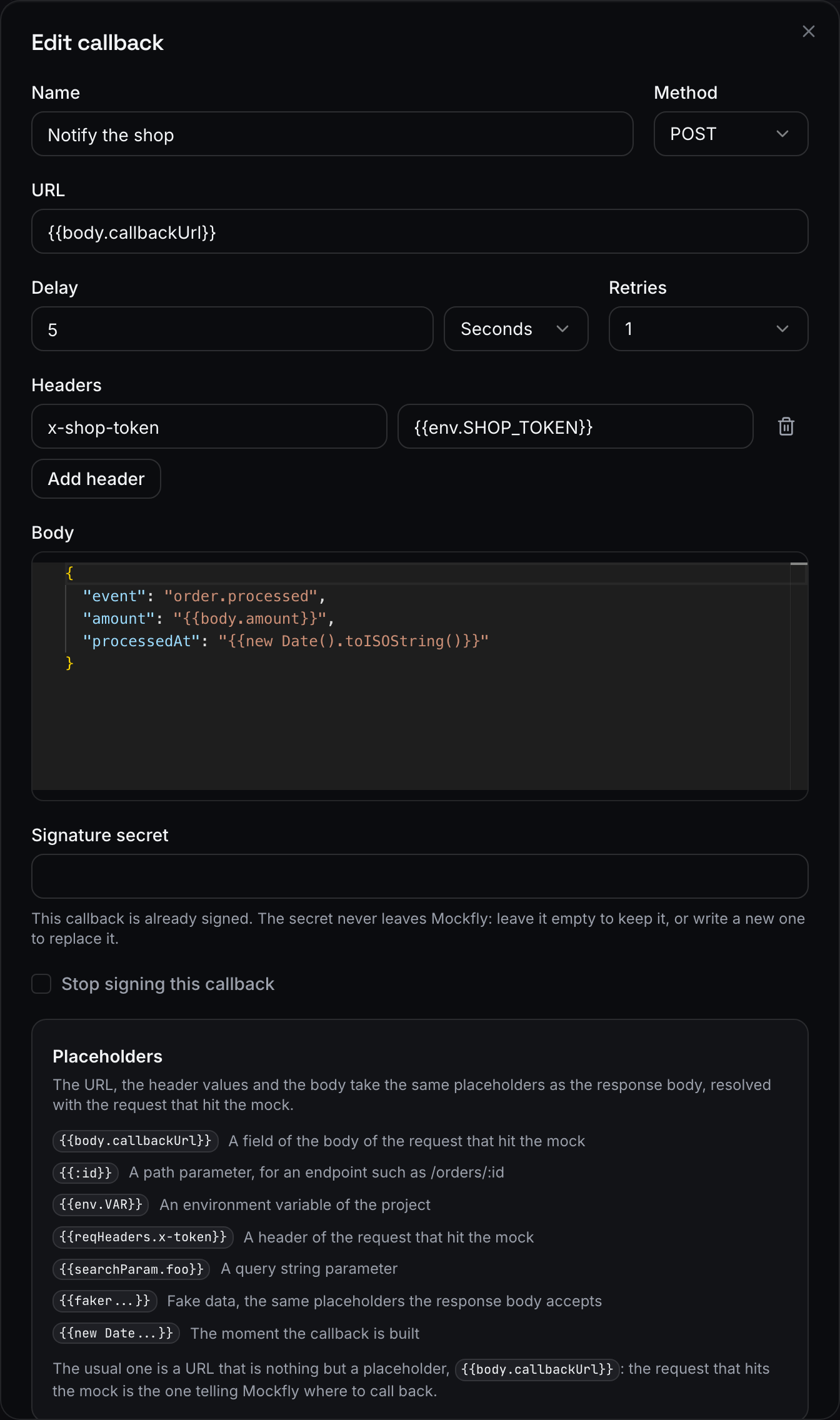
The fields that matter for a payment flow:
- URL:
{{body.callbackUrl}}. Your app tells the mock where to call back, exactly as it would tell a real gateway, so every developer and every preview branch gets its own webhook without reconfiguring the mock. - Method:
POST, the default. - Delay: a few seconds to see your pending state, or up to 24 hours if you want to test a payment that settles the next day. The mock still answers immediately; only the callback waits.
- Retries: up to 5 extra attempts when your endpoint does not answer with a 2xx.
- Signature secret: set one, so you can test verification (step 4).
And a body that mirrors the event your real provider sends:
{
  "type": "payment.succeeded",
  "orderId": "{{body.orderId}}",
  "amount": {{body.amount}},
  "paidAt": "{{new Date().toISOString()}}"
}
The callback body takes the same placeholders as a response body, resolved with the request that hit the mock, so the webhook carries the order id your app sent. Callbacks belong to a response, not to the endpoint: the 402 response can have its own payment.failed callback, or none at all. A response can hold up to three.
Step 3: receive the webhook locally
Mockfly only calls public destinations. Private, loopback and reserved addresses, localhost included, end as Blocked. To receive callbacks on your laptop, expose your server with a tunnel such as ngrok or Cloudflare Tunnel and send the public URL in the request:
ngrok http 3000

curl -X POST https://api.mockfly.dev/mocks/{namespace}/payments \
  -H 'content-type: application/json' \
  -d '{"orderId": "ord_1042", "amount": 42, "callbackUrl": "https://my-laptop.ngrok.app/webhooks/payments"}'
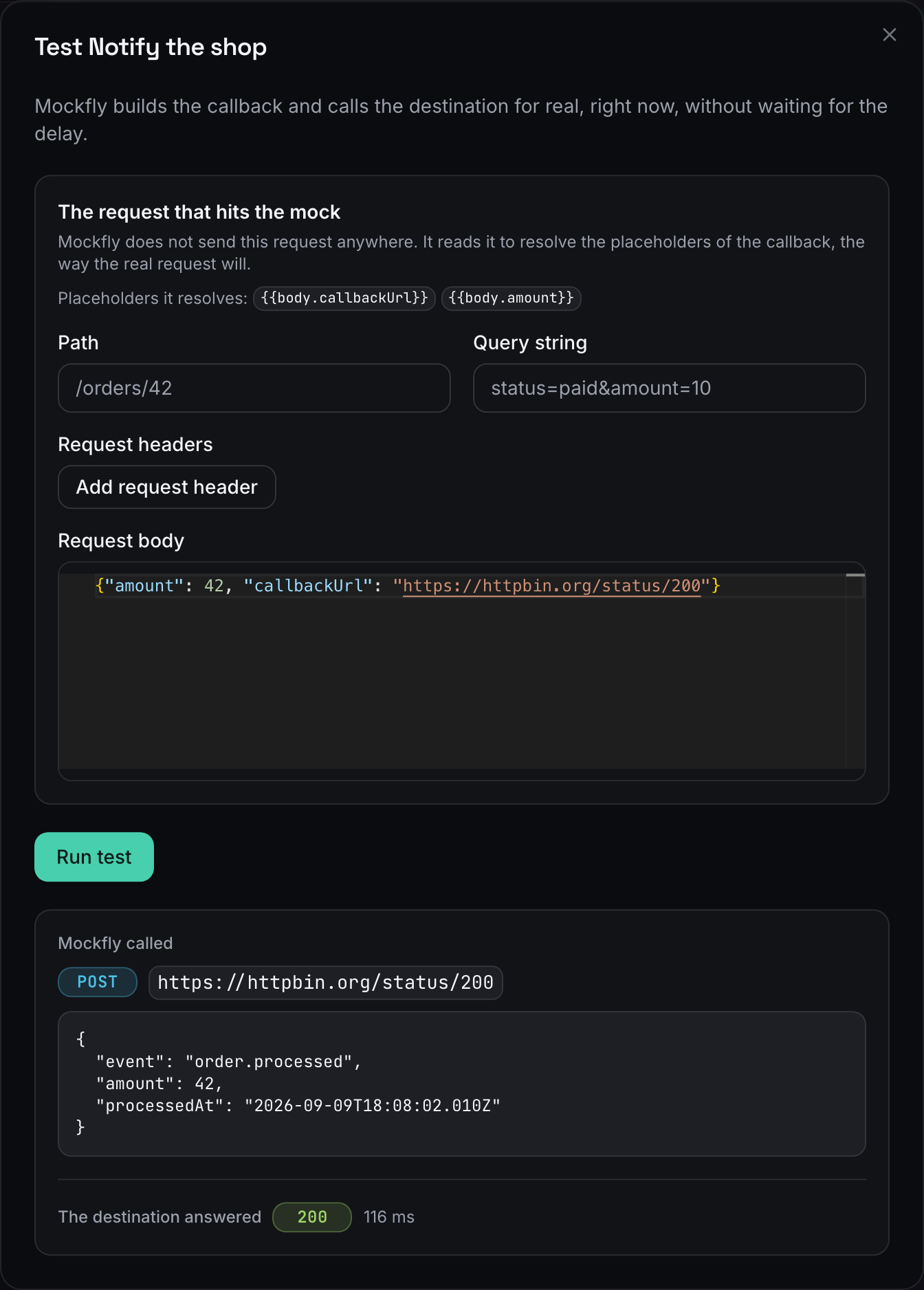
Before writing any handler code, use the play button on the callback to Test it. Mockfly asks for an example request to fill the placeholders, builds the callback, calls your destination right away (ignoring the delay) and shows both what it sent and what your server answered.
Step 4: verify the HMAC signature
With a signature secret set, every delivery carries two headers:
x-mockfly-signature: t={timestamp},v1={hex}: the Unix timestamp in seconds and the HMAC-SHA256, in hex, of{timestamp}.{body}computed with your secret over the raw JSON string.x-mockfly-delivery: the delivery id, the same across every retry of one delivery.
The scheme is the same family real gateways use: a timestamp to reject replays and an HMAC over the raw body. Here is an Express handler that verifies it. The important detail is express.raw: you must hash the body exactly as it arrived, before any JSON parsing, or the signature will never match.
import crypto from 'crypto'
import express from 'express'

const app = express()
const SECRET = process.env.WEBHOOK_SECRET

const isValidSignature = (header, rawBody) => {
  if (!header) return false
  const [timestampPart, signaturePart] = header.split(',')
  const timestamp = timestampPart.replace('t=', '')
  const signature = signaturePart.replace('v1=', '')
  const expected = crypto.createHmac('sha256', SECRET).update(`${timestamp}.${rawBody}`).digest('hex')
  if (signature.length !== expected.length) return false
  if (!crypto.timingSafeEqual(Buffer.from(signature), Buffer.from(expected))) return false
  return Math.abs(Date.now() / 1000 - Number(timestamp)) < 300
}

app.post('/webhooks/payments', express.raw({ type: 'application/json' }), async (req, res) => {
  const rawBody = req.body.toString('utf8')
  if (!isValidSignature(req.get('x-mockfly-signature'), rawBody)) {
    return res.status(401).send('invalid signature')
  }
  const event = JSON.parse(rawBody)
  await handlePaymentEvent(req.get('x-mockfly-delivery'), event)
  res.sendStatus(200)
})

app.listen(3000)
To test the rejection path, change the secret in your environment and fire the callback again: your handler should answer 401, and the delivery history will show the failed attempt with that status.
Step 5: make the handler idempotent and test retries
Retries are the part teams forget. If your handler times out after updating the order, the gateway does not know it succeeded and sends the event again. Mockfly reproduces this faithfully: an attempt that does not get a 2xx within ten seconds is retried with a growing backoff of 10 seconds, 1 minute, 5 minutes, 15 minutes and 1 hour, and redirects count as failures too.
Because x-mockfly-delivery stays the same across retries, it is a natural idempotency key:
const handlePaymentEvent = async (deliveryId, event) => {
  const alreadyProcessed = await db.webhookDeliveries.exists(deliveryId)
  if (alreadyProcessed) return

  await db.transaction(async tx => {
    await tx.webhookDeliveries.insert({ id: deliveryId, receivedAt: new Date() })
    if (event.type === 'payment.succeeded') {
      await tx.orders.update(event.orderId, { status: 'paid', paidAt: event.paidAt })
    }
    if (event.type === 'payment.failed') {
      await tx.orders.update(event.orderId, { status: 'payment_failed' })
    }
  })
}
A few scenarios worth running against the mock:
- Endpoint down: stop your server, trigger a payment, start it again a minute later. The retry should land and the order should end as paid, once.
- Slow handler: add an artificial wait longer than ten seconds. The attempt fails, the retry arrives, and your idempotency check must stop the second update.
- Late settlement: set a long delay and check that the UI shows "processing" and recovers when the webhook finally arrives.
- Declined card: send the decline test value, get the
402, and confirm no success webhook ever arrives for that order.
Step 6: read the delivery history
The clock button on a callback opens its last 50 deliveries, newest first, with the URL called, the number of attempts and the last error. Open the attempts to see each status code, its duration and the start of your server's answer.
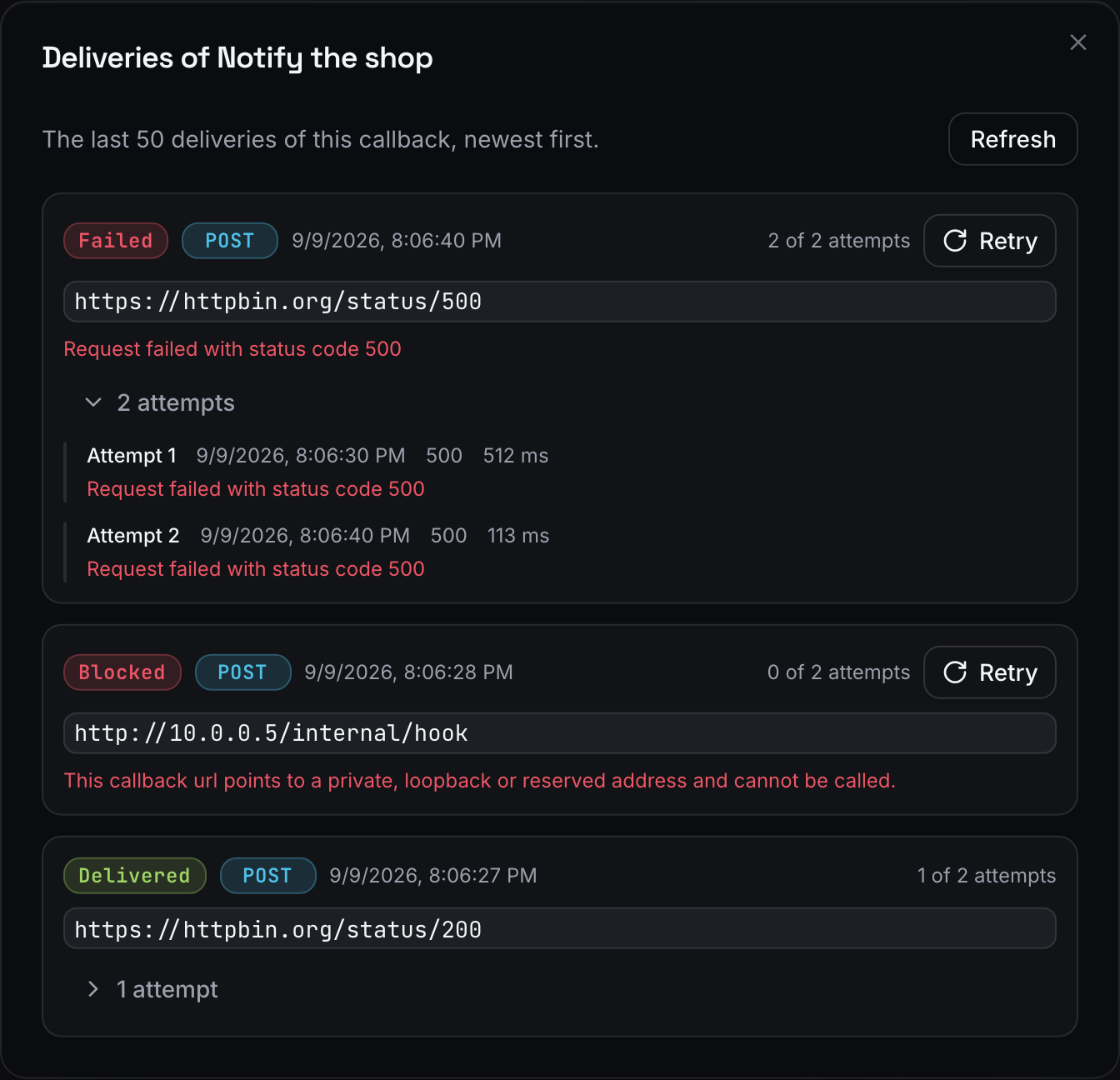
A delivery ends as Delivered on a 2xx, Failed when every attempt is spent, or Blocked when the URL resolved to a private address or to nothing. Failed and blocked deliveries have a Retry button that resends them with the same URL and body, which is handy after you fix a bug in the handler. A callback that points back at a Mockfly mock is not sent and shows as Skipped, so you cannot build an accidental loop.
Quick checklist
- The payment mock answers
202, and a rule serves a402for declines. - The callback URL is
{{body.callbackUrl}}, not a hardcoded address. - The handler verifies the signature over the raw body and rejects stale timestamps.
x-mockfly-deliveryis stored, and a repeated delivery changes nothing.- You have watched a retry land after your endpoint was down.
Callbacks are part of the Pro and Team plans. The full reference, limits included, is in the callbacks docs, and if you also need to reproduce timeouts and error codes on the request side, see simulating API errors and edge cases.
Mock your payment flowFrequently asked questions
Can a Mockfly callback reach my localhost?
Not directly. Mockfly refuses private, loopback and reserved addresses, localhost included, and marks those deliveries as Blocked. Expose your local server with a tunnel such as ngrok or Cloudflare Tunnel and pass the public URL as the callback destination.
How does Mockfly retry a failed webhook?
A callback can retry up to 5 extra times when the destination does not answer with a 2xx. Retries go out with a growing backoff of 10 seconds, 1 minute, 5 minutes, 15 minutes and 1 hour. Each attempt has ten seconds to answer, and redirects count as failures.
How do I verify the signature of a mock webhook?
Set a signature secret on the callback. Every delivery then carries an x-mockfly-signature header with a Unix timestamp and an HMAC-SHA256, in hex, of "{timestamp}.{body}" computed with your secret. Recompute it over the raw body and compare it in constant time.
How do I make my webhook handler idempotent?
Use the x-mockfly-delivery header. It is the id of the delivery and stays the same across all the retries of that delivery, so store it and ignore any request whose id you have already processed.
Which plans include callbacks?
Callbacks are part of the Pro and Team plans. They run while the project is on a paid plan; if the subscription of the project admin ends, pending deliveries are cancelled and the configuration is kept.