
Callbacks: let your mock call you back
Plenty of real APIs do not answer with the result. They answer 202 Accepted and, some seconds later, call a URL of yours with what happened: payment gateways, shipping providers, document signing, anything that takes longer than a request. Mocking only the 202 leaves the interesting half of that flow untested.
A callback is an outgoing webhook attached to a response of your mock. Once that response is served, Mockfly calls the URL you configured, on its own, with the method, headers and body you wrote — after a delay if you want one, and retrying if the destination is down.
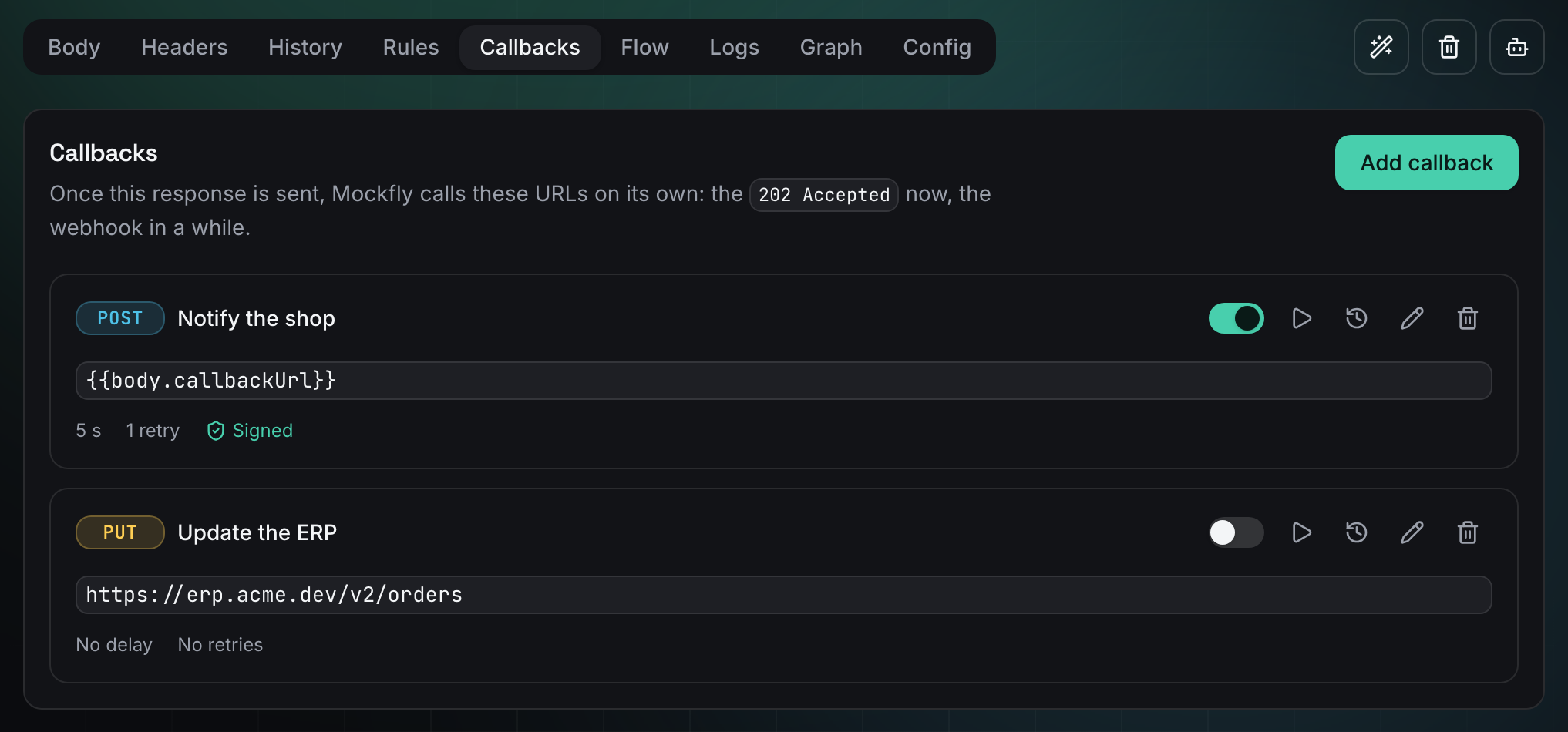
Callbacks are part of the Pro and Team plans. They belong to a response, not to the endpoint: the response that answers a request is the one whose callbacks fire, so a rule that serves 402 Payment Required can call a different URL than the one that serves 202 Accepted, or none at all.
Add a callback
Select the endpoint, pick the response in the selector at the top, and open the Callbacks tab, next to Rules and Flow. Click Add callback: a response can hold up to three.
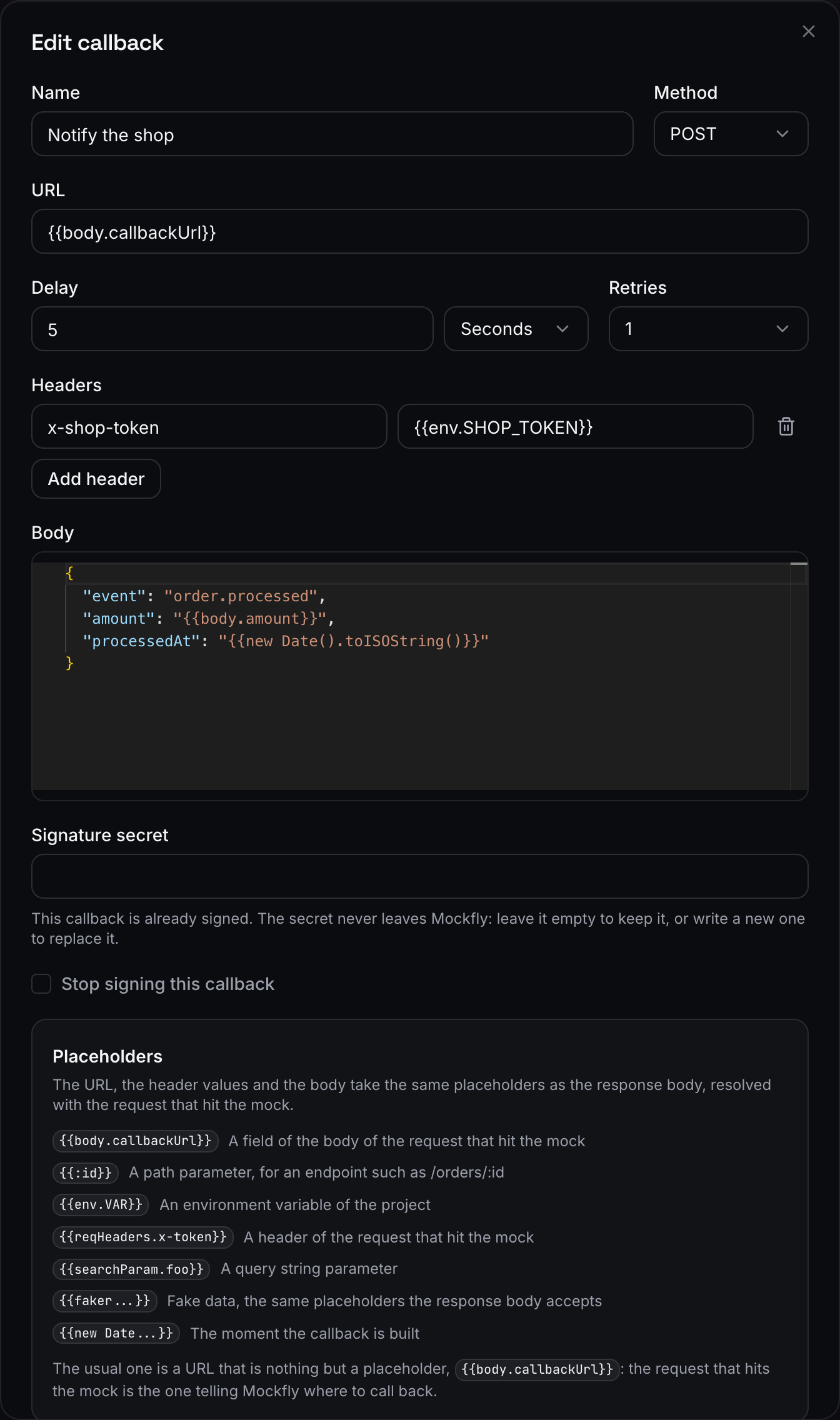
- Name — optional, only to recognise it in the list. Without one the list shows the URL.
- URL — where Mockfly calls. It has to be a public
httporhttpsURL, or a placeholder that resolves to one. - Method —
POST(the default),PUT,PATCHorGET. AGETcallback sends no body. - Delay — how long Mockfly waits before calling, from nothing to 24 hours. The mock answers straight away: the delay only moves the callback.
- Retries — up to 5 extra attempts when the destination does not answer with a 2xx.
- Headers — up to 20 of your own. Mockfly always sends
content-type: application/jsonand its ownx-mockfly-*headers, which cannot be overridden. - Body — a JSON object, up to 100 KB.
- Signature secret — optional; see Verify the signature.
The switch on the left of each row turns a callback off without deleting it: it keeps its configuration and its history, and stops firing.
Placeholders: where the URL comes from
The URL, the header values and the body take the same placeholders as a response body, resolved with the request that hit the mock:
{{body.callbackUrl}}— a field of the body of the request.{{:id}}— a path parameter, for an endpoint such as/orders/:id.{{searchParam.source}}— a query string parameter.{{reqHeaders.x-token}}— a header of the request.{{env.SHOP_TOKEN}}— an environment variable of the project.{{faker...}}and{{new Date().toISOString()}}— fake data and the moment the callback is built.
The usual setup is a URL that is nothing but a placeholder, {{body.callbackUrl}}: the app under test tells Mockfly where to call back, exactly as it would tell the real provider, and nobody has to reconfigure the mock for every developer or every branch preview.
curl -X POST https://api.mockfly.dev/mocks/{namespace}/orders \
  -H 'content-type: application/json' \
  -d '{"amount": 42, "callbackUrl": "https://my-laptop.ngrok.app/webhooks/orders"}'
A placeholder that resolves to nothing leaves the callback without a destination, and the delivery ends as Blocked instead of being sent.
Test it without hitting the mock
The play button on a callback opens Test. Mockfly builds the callback and calls the destination for real, right now, ignoring the delay, and shows you both halves: the URL and body it sent, and the status, duration and body the destination answered.
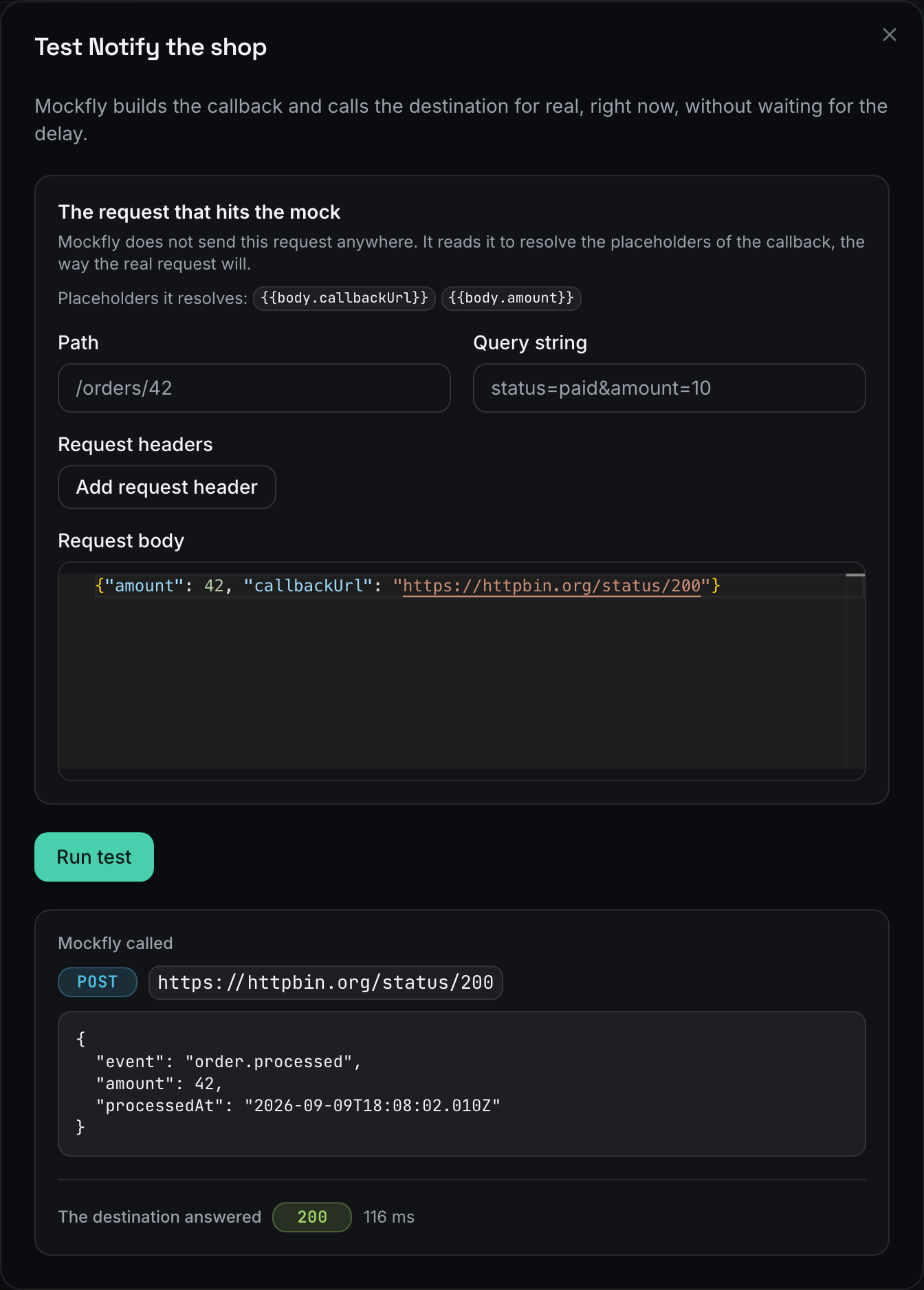
When the callback reads something from the request — the example above resolves its URL from {{body.callbackUrl}} — the modal asks for an example request first: a path, a query string, headers and a body. That request is never sent anywhere; it only fills the placeholders, the way the real request will. A callback with nothing to resolve is sent exactly as configured and the form does not appear.
The delivery history
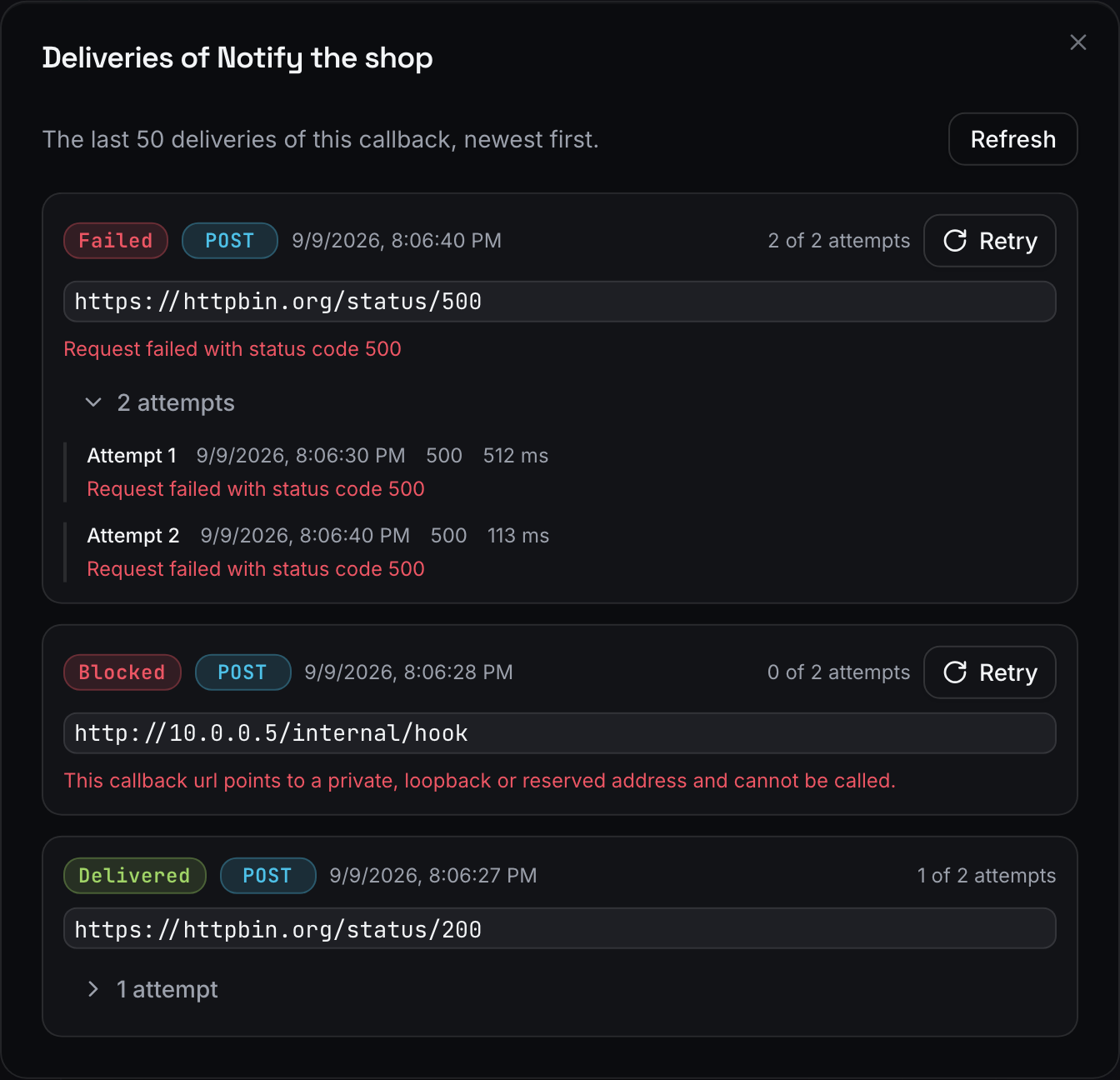
The clock button opens the last 50 deliveries of that callback, newest first, with the URL it called, when it was scheduled, how many attempts it took and the error of the last one. Open attempts to see each try with its status code, its duration and the first 2000 characters of the answer.
| Status | Meaning |
|---|---|
Pending | Waiting for its scheduled time — the delay, or the backoff of a retry. |
Sending | Mockfly is calling the URL right now. |
Delivered | The destination answered with a 2xx. |
Failed | Every attempt is spent and none got a 2xx. The error of the last one is shown. |
Blocked | Mockfly refused to call that URL: it resolves to a private, local or reserved address, or its placeholders left it empty. Retrying does not help. |
Cancelled | The callback was deleted, or the project stopped being on a paid plan, before it could be sent. |
Skipped | The mock was served to another callback delivery, so sending this one would have started a loop. Nothing was called. |
A failed or blocked delivery has a Retry button that sends it again right away, with the URL and body it was built with. Deliveries are kept for seven days.
Retries of a delivery that failed on its own go out with a growing backoff: 10 seconds, 1 minute, 5 minutes, 15 minutes and 1 hour.
Verify the signature
Write a signature secret in the callback and Mockfly signs every delivery with it, so your endpoint can tell a real call from anyone who guessed the URL. The secret never comes back out of Mockfly: to change it write a new one, and to remove it use Stop signing this callback.
Every signed delivery carries two headers:
x-mockfly-signature: t={timestamp},v1={hex}— the Unix timestamp in seconds and the HMAC-SHA256, in hexadecimal, of{timestamp}.{body}using your secret, where{body}is the raw JSON string Mockfly sent (empty for aGET).x-mockfly-delivery— the id of the delivery. It is the same across the retries of one delivery, so use it to make your handler idempotent.
import crypto from 'crypto'

const verify = (header, rawBody, secret) => {
  const [timestampPart, signaturePart] = header.split(',')
  const timestamp = timestampPart.replace('t=', '')
  const signature = signaturePart.replace('v1=', '')
  const expected = crypto.createHmac('sha256', secret).update(`${timestamp}.${rawBody}`).digest('hex')

  if (!crypto.timingSafeEqual(Buffer.from(signature), Buffer.from(expected))) return false

  return Math.abs(Date.now() / 1000 - Number(timestamp)) < 300
}
Sign the raw body as it arrives, before any JSON parsing and re-serialising, or the hash will not match.
Good to know
- The mock never waits. The response goes out with its own delay, and the callback is scheduled separately. A 24-hour callback does not hold the request open.
- Only public destinations. Mockfly refuses private, loopback and reserved addresses —
localhost,10.x,192.168.x, link-local and cloud metadata included. To receive a callback on your machine, expose it with a tunnel such as ngrok or Cloudflare Tunnel. - No loops. A callback that points at a Mockfly mock — its own endpoint or any other — is not sent, and the delivery shows as
Skipped. Mockfly recognises its own calls by thex-mockfly-deliveryheader they carry, so the chain stops at the first hop instead of feeding itself. - No redirects. A
3xxis not followed and counts as a failed attempt. - Ten seconds per attempt. A destination that takes longer is a failed attempt, and the retries apply.
- Disabled responses and the proxy. A callback fires when its response is actually served, so a request answered by the proxy, or by another response, does not trigger it. The Flow tab shows which response wins.
- They run while the project is on a paid plan. The plan of the project admin is what counts: if the subscription ends, the pending deliveries are cancelled and the configuration stays untouched.
- HTTP endpoints only. WebSocket endpoints have their own broadcasts instead — see WebSocket mocking.