
Why is my mock API returning the wrong response?
You added a rule that should return a 402, you send the header, and the mock keeps answering 201. Or it answers the error case for a request that should succeed. An endpoint with a few responses, some rules, a proxy setting and a delay is easy to build and hard to keep in your head. This guide walks through the usual causes and how to find the real one in a minute with the Mockfly Flow tab, instead of by trial and error.
The symptom: a test that suddenly gets the wrong body
A wrong mock response rarely looks like a mock problem. It shows up as a frontend that renders the happy path when you expected an error banner, or an E2E test that fails on an assertion far away from the request. Take a POST /orders endpoint with three responses:
- Order created,
201, the default response. - Empty cart,
400, with a rule: frombodyifitemsis empty. - Payment required,
402, with a rule: fromheaderifx-payment-statusis equal todeclined, or fromjsonPathif$.payment.card.last4is equal to0002.
And a request that, according to you, should get the 402:
curl -i -X POST https://api.mockfly.dev/mocks/<your-project-slug>/orders \
  -H "Content-Type: application/json" \
  -H "x-payment-status: declined" \
  -d '{ "items": [], "payment": { "card": { "last4": "4242" } } }'
Which response comes back? The answer depends on more than the rules: on the proxy, on random mode, on which responses are enabled and on the order of the response list. That is exactly what the Flow tab draws.
Open the Flow tab
Select the endpoint and click Flow, next to the Rules tab. You get a read-only diagram of every decision the mock engine takes for a request to this endpoint, in the order it takes them, with your values in it. It is built from the current configuration, so a rule you add in the Rules tab appears straight away. Drag to pan, use the wheel to zoom, and the controls in the bottom-left corner to fit the diagram back into view.
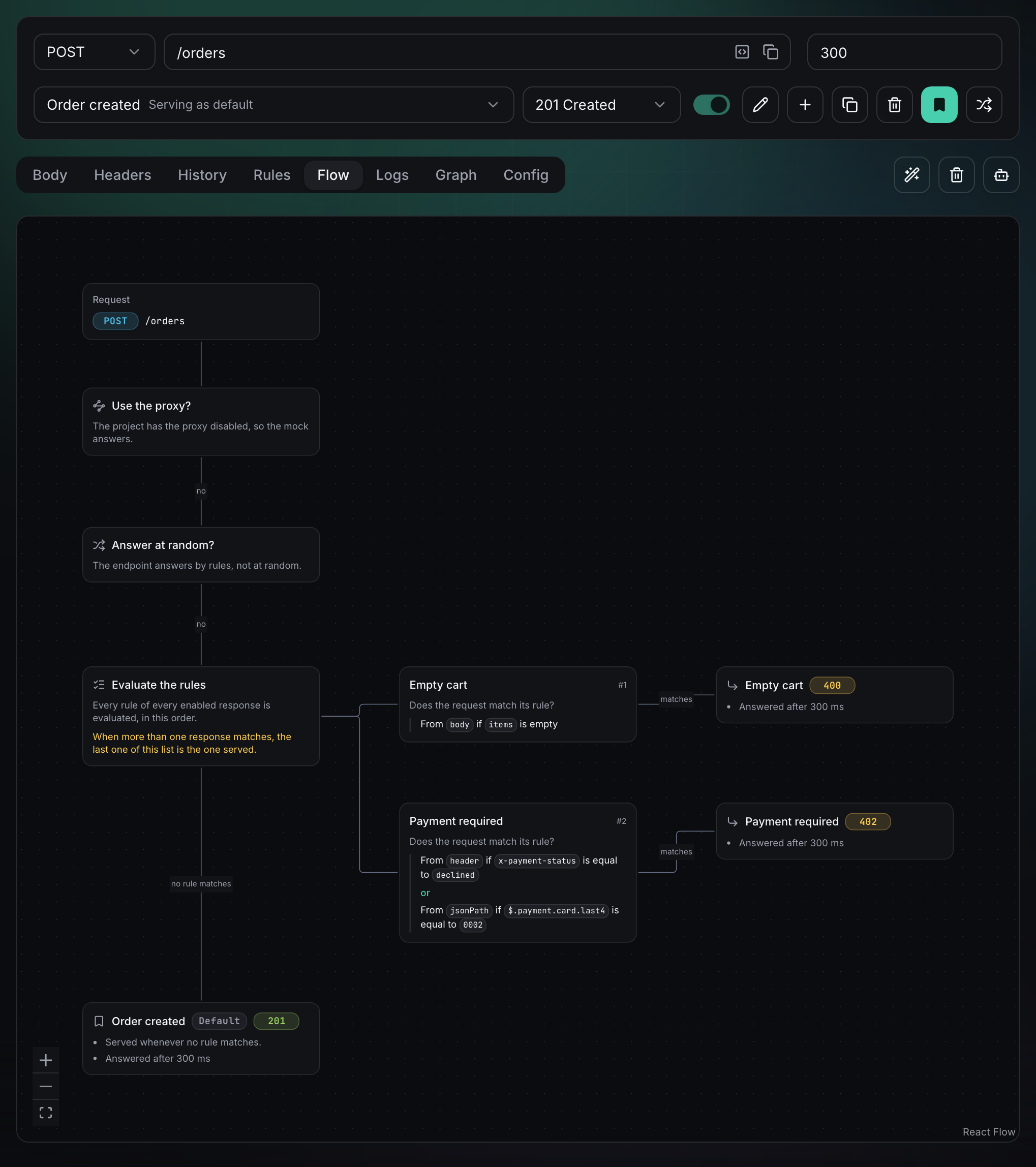
The column on the left is the path every request walks from top to bottom. Every branch to the right is a way out: once a request leaves the spine, it is answered. Let's walk it in order, because each step is a classic cause of "the mock returns the wrong thing".
Cause 1: the request never reaches the mock (proxy)
The proxy is checked before anything else. If it applies, the request is forwarded to your real API and nothing else in the diagram happens: no rule is evaluated, and neither the delay nor the request log apply to that branch. The confusing part is that the decision can live in two places. An endpoint has three proxy settings in its Config tab:
- Use proxy: always forward this endpoint, whatever the project says.
- Use mock: always answer with the mock, even if the project proxy is on.
- Use inherited settings from project: the default, which follows the project proxy.
Someone turns on the project proxy to try the real backend and forgets about it, and every inheriting endpoint stops serving your mocks. The Use the proxy? card tells you which setting decides: The project has the proxy disabled, so the mock answers is a different sentence from This endpoint always goes through the proxy, whatever the project says, and the difference is where you go to change it. When the proxy is on, the whole mock part of the diagram is dimmed:
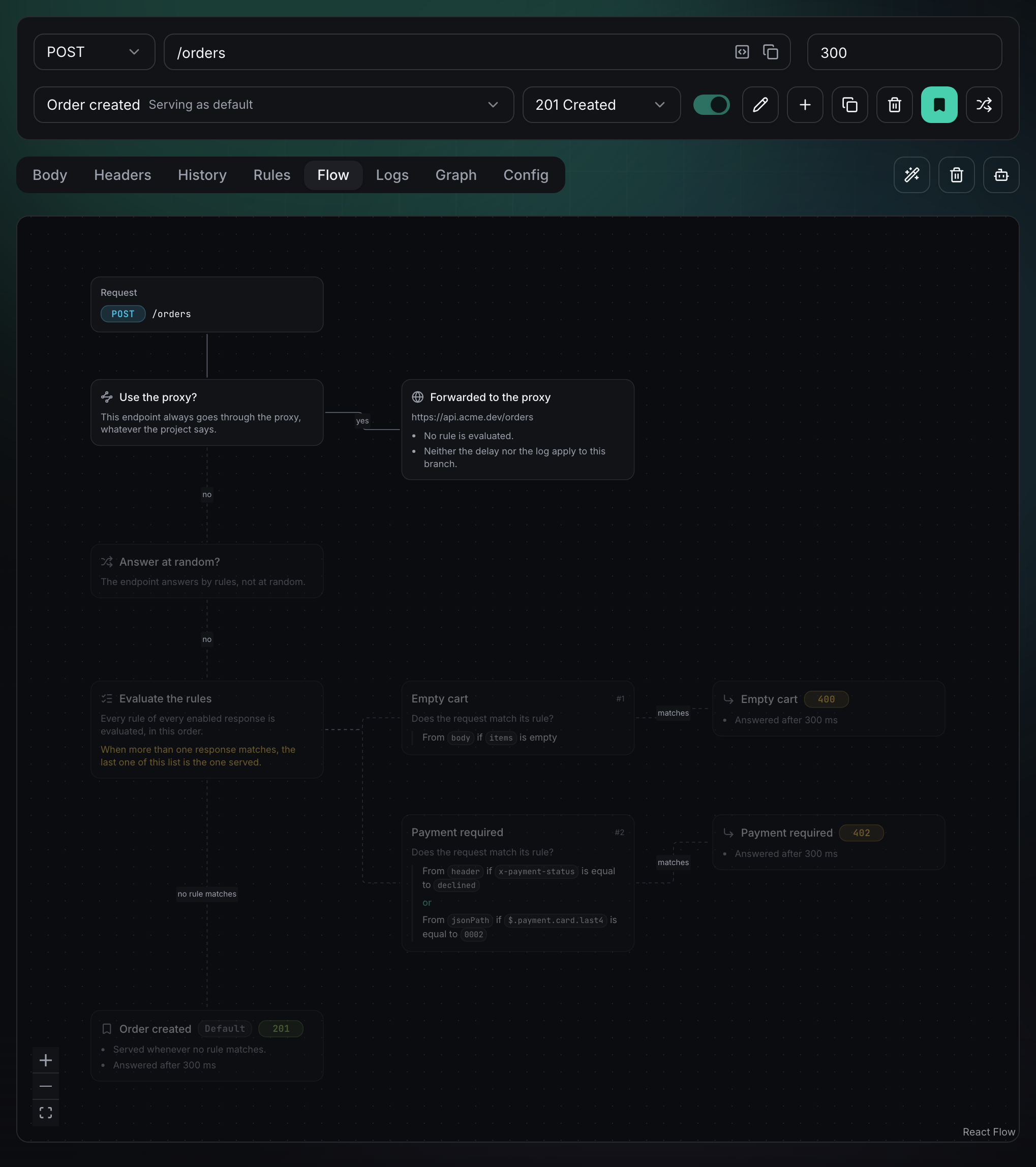
One more case: if the endpoint goes through the proxy but the project has no proxy URL configured, the card warns you that the request answers 500. If you see unexplained 500s from a mock, check this first.
Cause 2: the response you expect is disabled
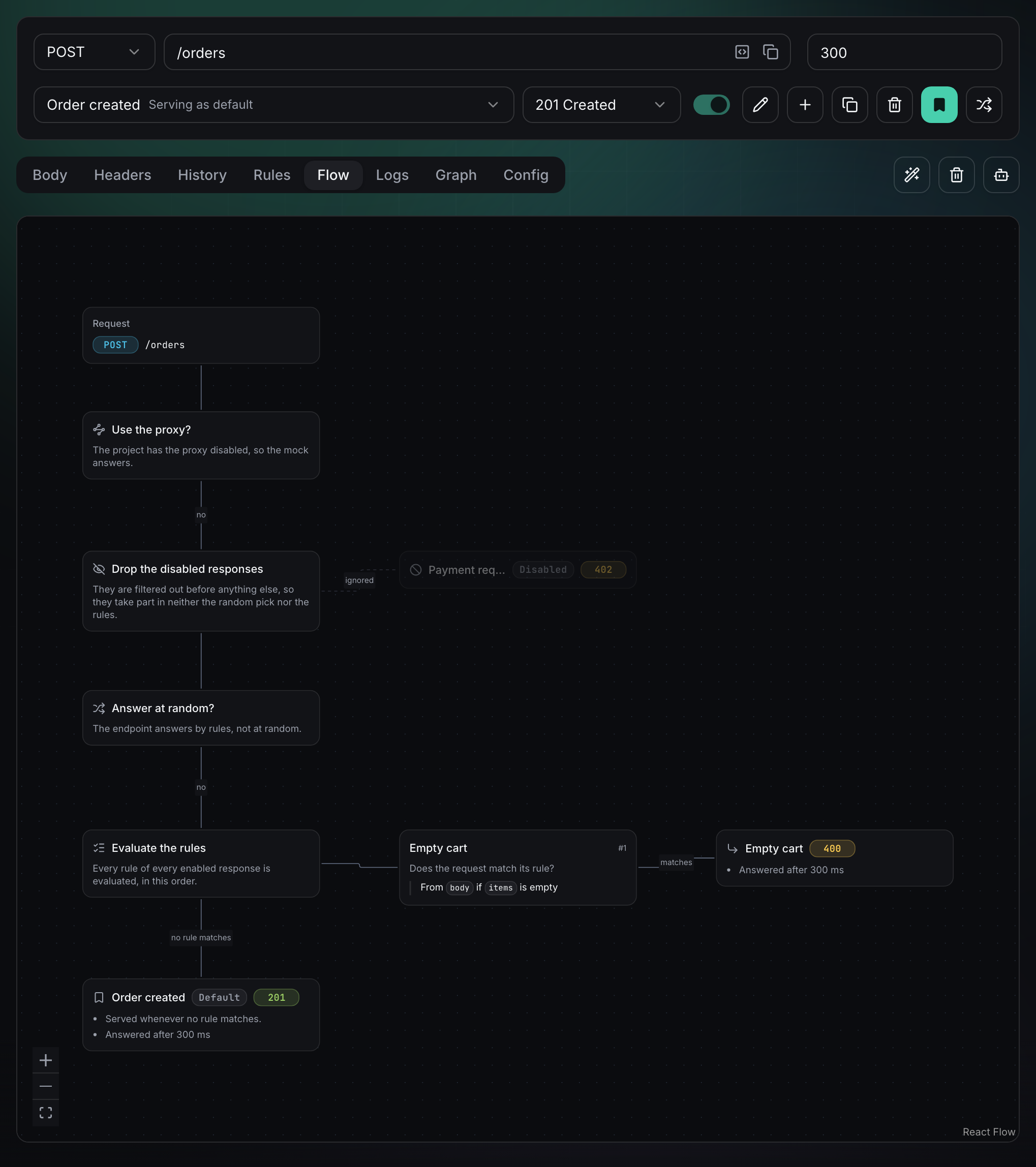
A disabled response is filtered out before anything else, so it takes part in neither the random pick nor the rules. Its rules can be perfect and it will still never answer. When the endpoint has at least one disabled response, the diagram adds a Drop the disabled responses step and shows the response as a dimmed card with an ignored label, so a response someone switched off weeks ago stops being a mystery:
Cause 3: random mode is on
Random response is great for chaos testing your UI, and terrible when you forget it is on. It is not a tie-break: while it is enabled, one of the enabled responses is picked at random and no rule is evaluated at all. The symptom is a test that fails some of the time with different status codes. The Answer at random? card shows the current answer, and when random is on the rule branch is dimmed, the same way the proxy dims the mock.
Cause 4: two rules match and the last one wins
This is the case that costs the most time to debug from the outside. Rules in Mockfly are not exclusive: a request can match the rules of several responses at once. When that happens, the last matching response of the list is the one served.
Go back to the request at the top. Its body has "items": [], so it matches the Empty cart rule. It also sends x-payment-status: declined, so it matches Payment required. Both match, and Payment required is lower in the list (check #2 in the diagram), so the request gets the 402. If you expected the 400 for an empty cart, the rules are right and the order is wrong.
The Evaluate the rules card shows one check per enabled response that has rules, numbered #1, #2… in evaluation order, and warns you explicitly whenever more than one enabled response has rules. You can fix an overlap in two ways:
- Reorder: put the response that should win when both match lower in the list.
- Make the rules exclusive: add a condition so they cannot both match. For example, give Payment required a second condition with the
isNotEmptycomparator onitems, and switch the Match toggle to AND (or use a nested AND/OR group to keep the existing OR between header and card).
Exclusive rules are easier to reason about for the next person who edits the endpoint, and they make each scenario reproducible with a single input.
Cause 5: the default response has rules too
Being the default does not exempt a response from its own rules. The rules of the default response are evaluated like everyone else's; being the default only means it also answers when nothing matched. If you added a rule to the default response while experimenting, it can win an overlap you did not expect. And if an endpoint has no default response at all, the spine ends in a No default response card: set one from the response actions so unmatched requests have somewhere to land.
Cause 6: the rule itself never matches
If the diagram shows the right order and nothing is dimmed, look at the condition text. Rule checks are written with the same sentences as the Rules tab, including AND/OR groups, so typos stand out. A few things to check against the comparator reference:
- The source: a value sent in the query string will not match a rule that reads from the body, and a URL parameter is only available when the path defines it, like
/orders/:orderId. - Number comparators:
greaterThan,lessThanand friends read both sides as numbers; if either one is not numeric, the rule simply does not match. - Presence comparators:
exists,notExists,isEmptyandisNotEmptytake no value.isEmptytreats a missing property,"",[]and{}as empty. - Long values: the diagram truncates them to keep cards readable. Click the card to open the rule and see the whole value.
Every card with a response behind it is clickable: it selects that response and opens its Rules tab, so reading the diagram and fixing what it shows are the same gesture.
Check what really happened: the Logs tab
The Flow tab tells you what would happen with today's configuration. To confirm what your app actually got, open the Logs tab of the endpoint: it lists the calls made to it with the timestamp, the route and the status code of the response (refresh with the Refresh logs button). A missing call usually means the request went through the proxy or hit a different path; a status code you did not expect points you back to the diagram.
Remember that the diagram covers how the response is chosen. What happens to the body afterwards, Faker.js placeholders, body substitution and custom headers, applies to whichever response it ends on. If the status is right but a field looks wrong, the problem is in the response template, not in the rules.
A quick debugging checklist
- Does the request show up in the Logs tab with the path you expect?
- Is the proxy deciding, on the endpoint or inherited from the project?
- Is the response you expect enabled?
- Is Random response on?
- Does more than one response match? The last one in the list wins.
- Does the default response have rules of its own?
- Does the condition read from the right source, with the right comparator and value?
If you drive test scenarios with a header, as in simulating API errors and edge cases or mocking APIs in Playwright and Cypress, open the Flow tab whenever you add a scenario: it is the fastest way to be sure the new rule does not shadow an old one. The full reference is in the request flow docs.
Open your endpoints in MockflyFrequently asked questions
In which order does Mockfly choose the response for a request?
Proxy first, then disabled responses are dropped, then random mode is checked, then the rules of every enabled response are evaluated in list order, and finally the default response answers if no rule matched.
Two responses match the same request. Which one is served?
The last matching response of the list. Rules are not exclusive, so when several enabled responses match, the one lower in the response list wins. The Flow tab warns you about this whenever more than one enabled response has rules.
Why are my rules ignored completely?
Usually one of two things: the request is forwarded by the proxy (set on the endpoint or inherited from the project), or Random response is on. In both cases no rule is evaluated, and the Flow tab dims the rule branch.
Does the Flow tab show what happened on a real request?
No. It shows what would happen with the current configuration. To see the calls your app actually made, with timestamp, route and status code, use the Logs tab of the endpoint.
Is the Flow tab available on the free plan?
Yes. It is available on every plan and for every HTTP endpoint. WebSocket endpoints do not have it.